
|
 |
👋 Hi, Wyndo here! Welcome to The AI Maker, where I'm making AI more accessible for everyday life. I share practical strategies to build smarter, work faster, and live better—with AI.
How I Built SEO Optimized Content Machine Using Claude Cowork and Apify
It scrapes Google, find keyword gaps, and write SEO articles while you sleep. Full setup guide with prompts, skills, and automation inside.
|

| |||||||||||||||


 |
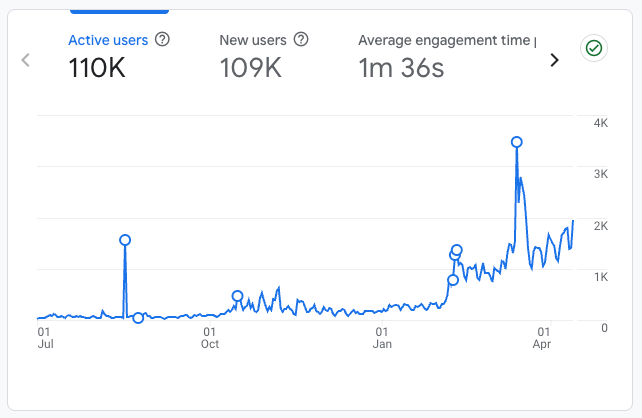
A year ago, almost all of my traffic came from Substack itself. Recommendations, notes, the home feed. Google barely sent anyone.
That’s changed. Right now about 20% of my traffic comes from search, and it’s growing faster than any other channel.
 |
That didn’t happen by accident. I’ve spent months going back through old posts, restructuring headings, adding backlinks, rewriting titles. I even built a Claude Skill that runs an SEO framework on every post before I publish. It analyzes what’s already ranking, structures the headings correctly, and handles the optimization so I don’t have to think about it every time.
But here’s what I kept running into. My skill handles the writing side. It can take a topic I’ve already chosen and make sure the article is structured to compete in search. What it can’t do is tell me whether anyone is actually searching for that topic in the first place. It doesn’t pull real keyword volumes. It doesn’t show me how stiff the competition is. It doesn’t tell me whether I’m writing into an open field or a crowded one.
That’s a different problem. And honestly, it’s the harder one to solve, because you need live data from Google before a single word gets written.
Today’s guest post from Gencay shows you exactly how to set that up. He writes LearnAIWithMe, a practical AI tutorials for people who’d rather replace than be replaced by AI.
 |
This is the second time Gencay has written for AI Maker; his previous post, “3 Hidden NotebookLM Features Most People Don’t Use,” is a must‑read for those of you who love NotebookLM.
Before we continue, check out his three latest posts to find out more about what he writes:
I Built a Self-Updating Trading Bot (Claude & NotebookLM & Karpathy’s Method)
Claude Code MasterClass For Everyone (Part 1): Installation & Build Your First App
Gencay built a pipeline using Claude Cowork and Apify that runs the research first. It scrapes Google for what’s already ranking, pulls real keyword volumes and difficulty scores, finds the content gaps nobody has filled, and then feeds all of that into a Claude Skill that writes the article with the right keywords in the right places. The whole thing runs while he’s doing other things, and the finished article lands in his Google Drive built on real market data instead of guesses.
What makes this post worth your full attention is that the framework isn’t locked to SEO articles. Swap the Apify actor and you have a Reddit insight machine, an Amazon product research pipeline, a YouTube transcript rewriter, or a LinkedIn trend tracker. The pattern stays the same: scrape real data, feed it to a skill, let the output compound while you’re doing something else. If you publish anything online, there’s a version of this that fits your workflow.
🎁 One more thing worth flagging:
Gencay also packaged the writing logic into a Claude Skill called the SEO Writer skill, and that skill is attached to this post for paid members. It’s the first practical asset from the direction I shared in the year-one announcement, and more experts with more specialized AI workflows are already on the calendar.
If you want the skill today, you can grab it below. But, quick heads-up: the paid tier moves from $10 to $15 on April 16, so the $10 window is still open for three more days. The rest of this post is available for everyone!
Here’s Gencay.
Hello, good to be back here 👋🏻
Most people use Claude Cowork to organize folders.
I used it to build a content machine that scrapes trending keywords, writes SEO articles, and publishes them.
Every day.
While I was working on other tasks, it worked for me.
The whole setup took 45 minutes.
Let me show you exactly how.
🚨 A quick note from sponsor…
 |
Most AI tools help you brainstorm. Atoms helps you build and grow. Turn ideas into real, usable products faster with AI, then get traffic and real customers with built-in SEO and Ads agents. A workflow designed for builders and founders who want to ship, not just chat.
What is Claude Cowork (Quickly)
If you know Claude Code, you already get this.
Claude Code is built for developers. Work through the terminal or the Claude app.
Claude Cowork is the same power. But with a desktop interface.
You tell it what you want. It figures out how to get there.
It reads your files. Writes new ones. Connects to Google Drive, Gmail, Slack, and Notion. Opens your browser. Uses your apps. You can connect to it now using your phone (Dispatch) or control your computer.
The key difference from regular Claude chat: Cowork doesn’t just answer. It executes.
You say, “Pull data from this spreadsheet, clean it, and send me a summary over Slack.”
It does all three.
Without you touching anything.
That’s the foundation. Now let me show you what I built on top of it.
The Stack (Simple Setup): Claude Cowork + Apify
We’ll use two tools. That’s it.
Claude Cowork: the brain that reads, writes, and publishes.
Apify: the scraper that feeds the brain.
Apify is a web scraping platform.
Thousands of pre-built scrapers (they call them “Actors”) sitting in a store.
Google Search scraper. Reddit scraper. Amazon scraper. You name it.
You don’t write code. You pick an Actor, give it inputs, and hit run. It spits out structured data.
And there are 22K+ actors.
The Actors we’ll use: Google Search Results Scraper and Google Keyword Scraper.
They scrape Google results and keywords.
Organic results, People Also Ask questions, and related searches.
Everything Google shows for a keyword.
First, let me show you how to connect Apify with Cowork.
How to connect Apify with Cowork
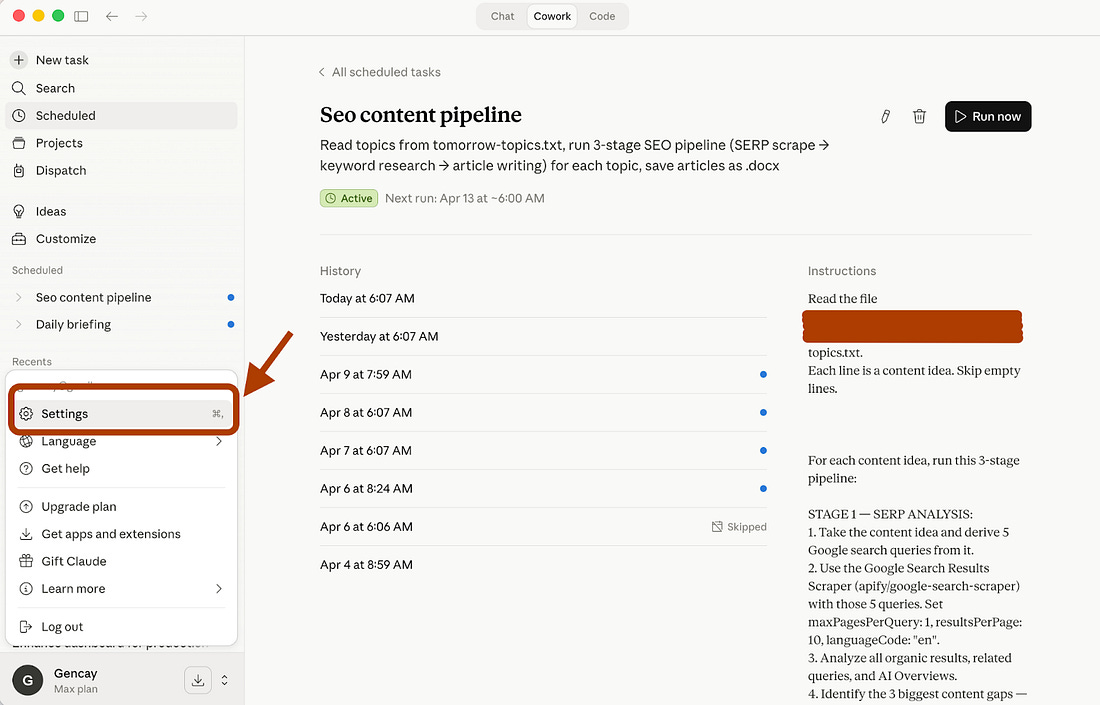
To connect your Apify with Cowork, go to “Settings” on the Claude Desktop app.
 |
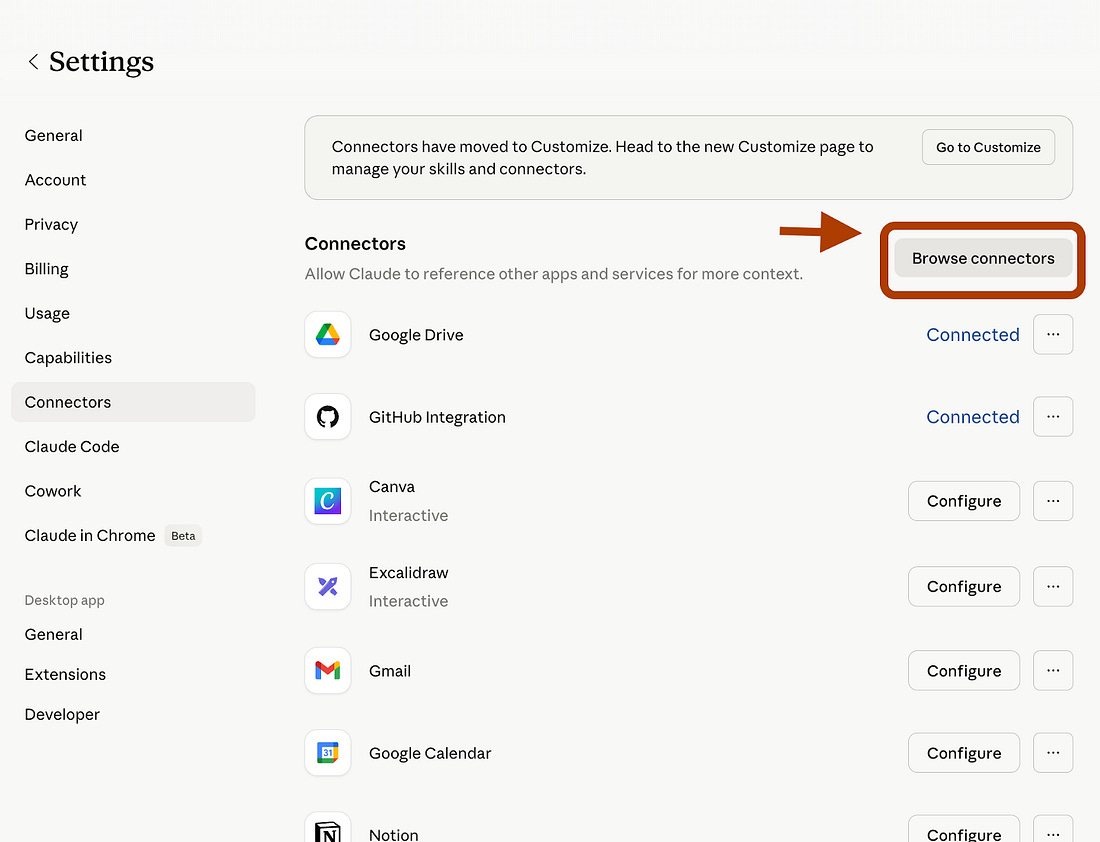
Here, click on “Connectors” and click on “Browse Connectors.”
 |
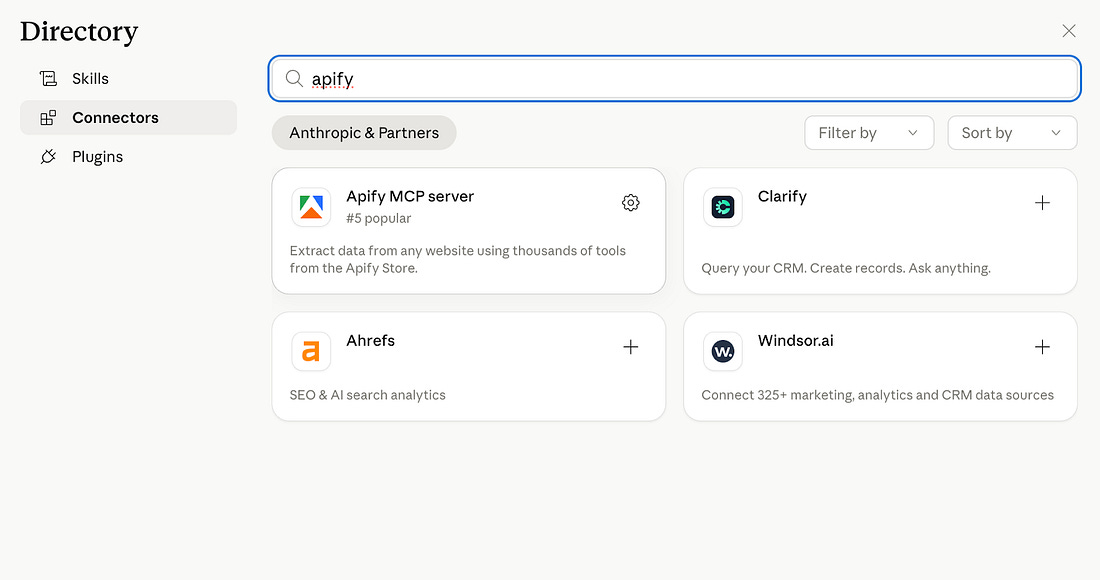
Next, search for Apify and install it.
 |
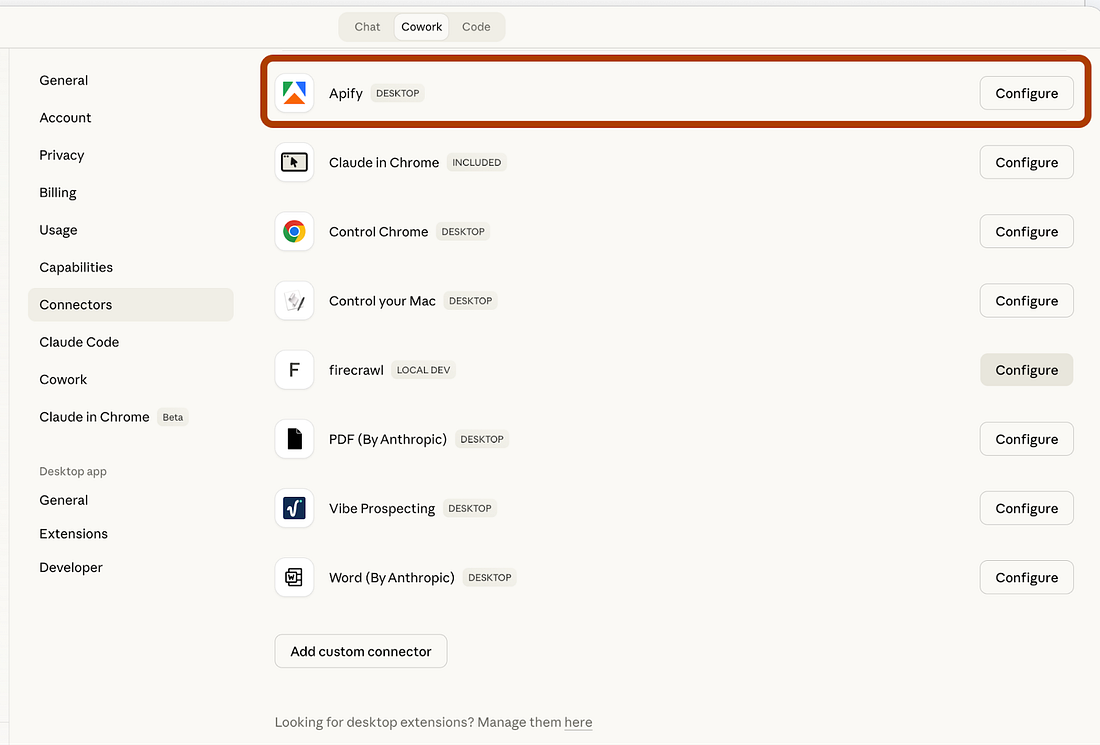
After installing it, click on “Configure.”
 |
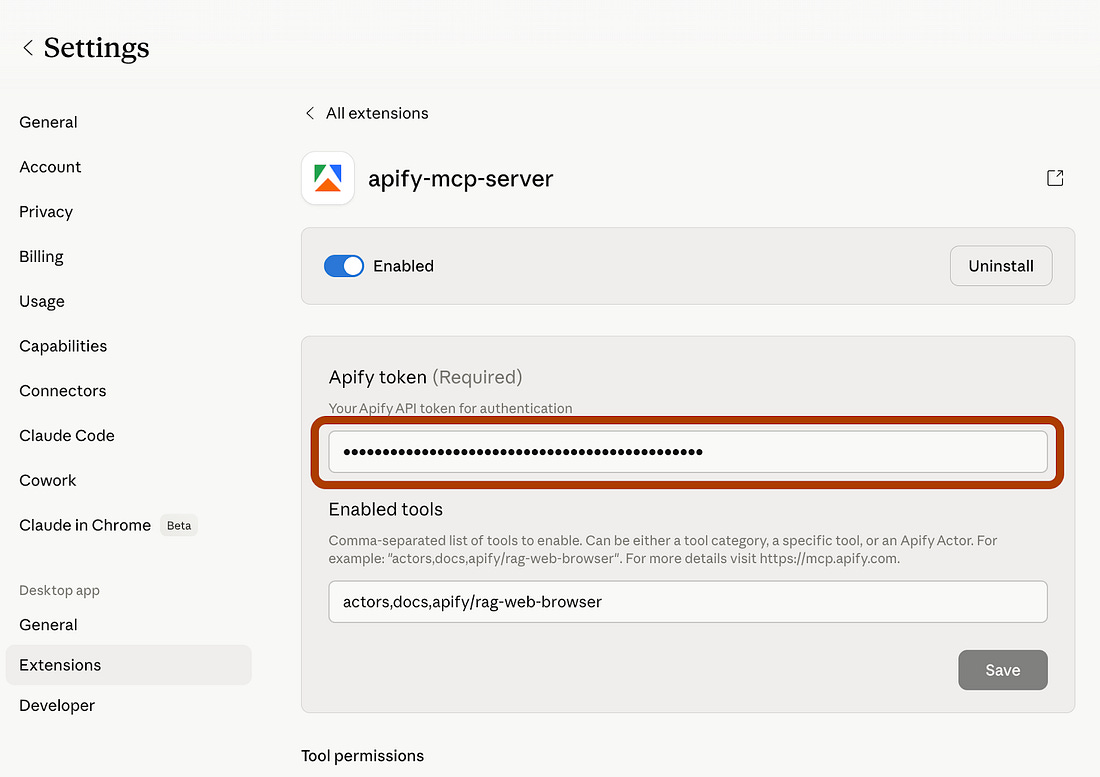
And paste your Apify API key here.
 |
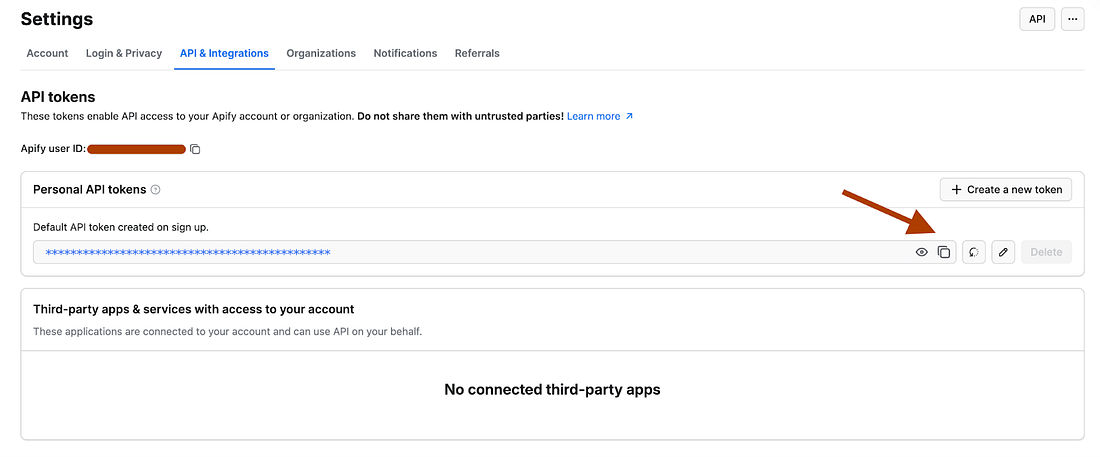
If you don’t have an Apify API key, visit https://console.apify.com/settings/integrations, and get your FREE API key.
 |
Now you’re all set.
Use Case: Daily SEO Content Machine
We will build it in three steps.
Each one feeds the next.
By the end, you have a complete SEO article built on real data. Not guesswork.
Stage 1: Find the Article Topic
Actor: Google Search Results Scraper (You’ll be charged per event to use this actor, but Apify provides you with $5/month of free usage).
This is the starting point. You give it 5-10 content ideas. It scrapes Google and returns the data.
I don’t care about the organic results themselves. I care about the gaps.
And when you look at the top 10 results and see thin content, outdated posts, or generic listicles, that’s your opening.
Use case: OpenClaw vs Claude Code and Cowork
Let’s test it.
I want to write about OpenClaw and compare it with Claude Code and Cowork.
Here is the prompt that scrape google using this Apify actor via Cowork.
“Here is my content idea: I want to write about OpenClaw and compare it with Claude Code and Cowork. Use the Google Search Results Scraper to analyze what’s already ranking on Google for this topic. Derive 5 search queries from my idea, scrape the results, and give me a summary table showing: each query, number of organic results, top sources, and whether Google triggered an AI Overview.”
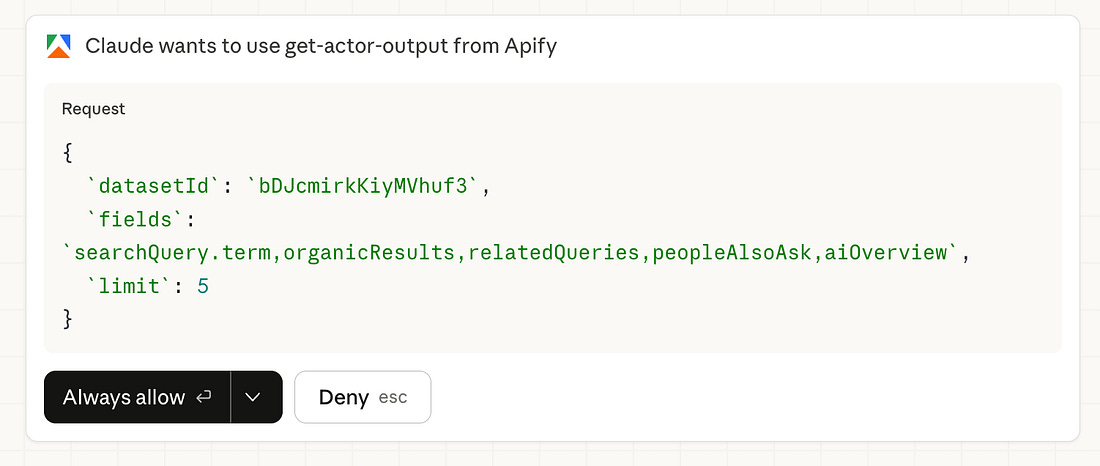
It will ask your permission before using Apify.
 |
After your approval, here is the output:
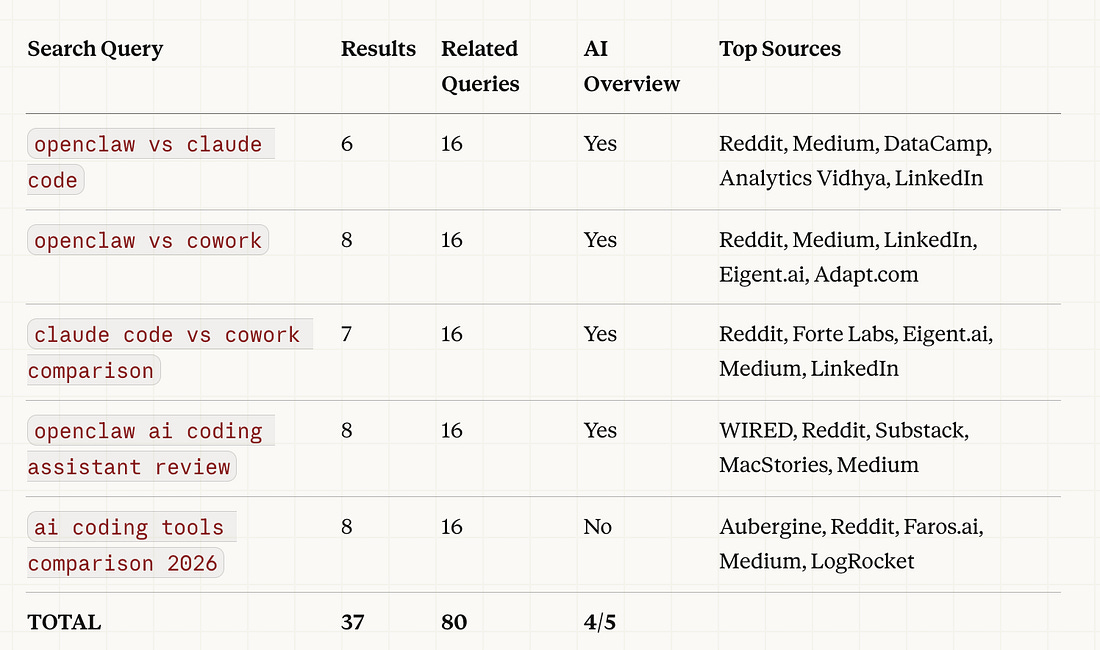 |
Now I have the full picture. 37 organic results across 5 searches. 80 related queries showing what people actually type into Google. 4 out of 5 searches triggered AI Overviews, which means Google already has strong answers for these topics.
But I haven’t written the article yet. First, I need to find the gaps. What’s missing? What’s thin? What angle hasn’t been covered?
So I give Cowork the second prompt:
“Read the SERP data. Analyze the top 10 results for each search. Find the 3 biggest content gaps, topics where existing results are thin, outdated, or missing depth. For each gap, give me: the topic, why it’s a gap, and a suggested article angle.”
And here are the gaps.
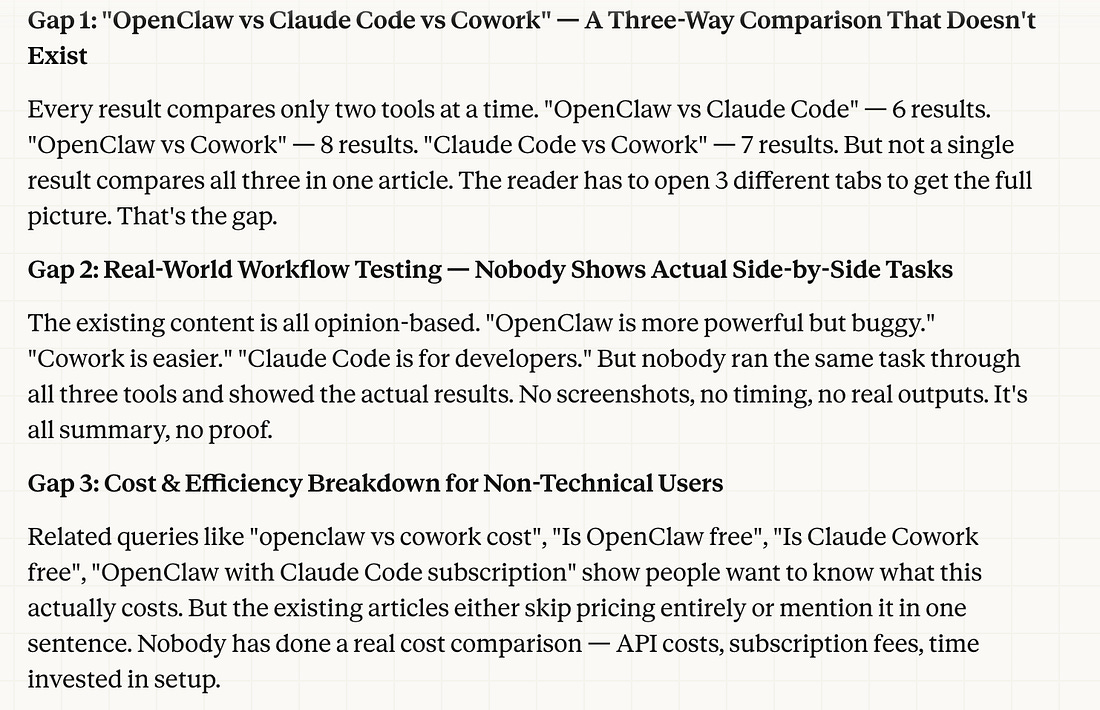 |
Based on these gapes, I selected Gap 1: “OpenClaw vs Claude Code vs Cowork” — A Three-Way Comparison That Doesn’t Exist
Now let’s move on to the next stage.
Stage 2: Find the Keywords
Actor: Google Keyword Data Scraper (You’ll be charged per event to use this actor, but Apify provides you with $5/month of free usage).
Now you have three content gaps. But gaps without keyword data are guesswork.
You know what’s missing from Google. You don’t know if anyone is searching for it.
This is where the Google Keyword Data Scraper comes in. You feed it the topic phrases from your content gaps. It returns hard numbers. Search volume. Ranking difficulty. Related terms.
You pick the one you want to write. I went with Gap 1, the three-way comparison. Nobody has written it yet. So I give Cowork the next prompt:
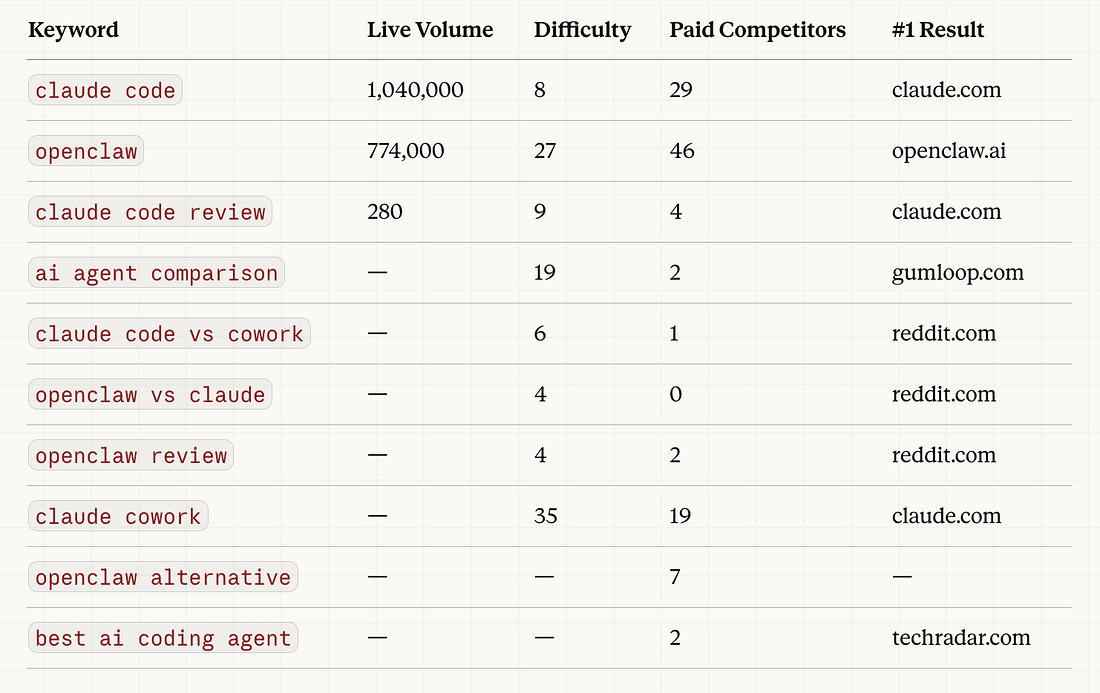
“I’m going with Gap 1: OpenClaw vs Claude Code vs Cowork comparison. Use the Google Keyword Data Scraper to pull search volume and difficulty for 10 keyword variations around this topic. Show me which ones I can realistically rank for.”
Here are keywords.
 |
Now let’s see Claude Cowork Analysis:
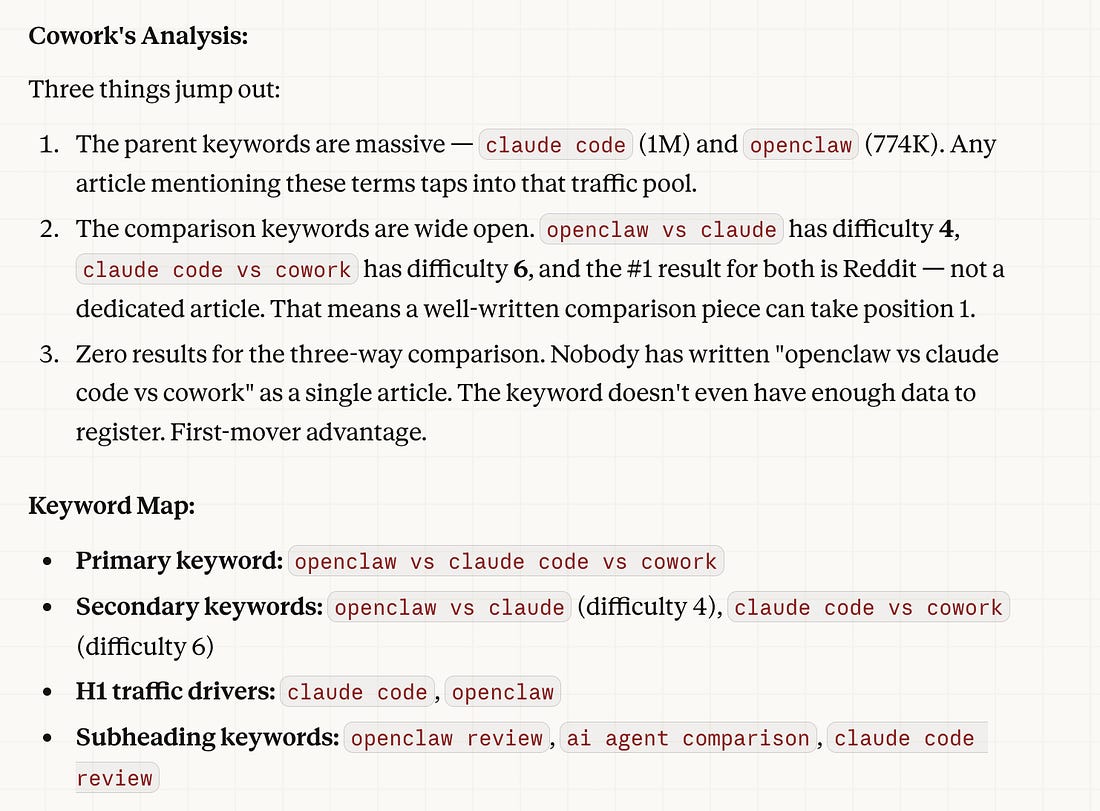 |
Cowork doesn’t just dump raw keyword numbers at you. It reads the data and tells you what matters.
Three things stood out here:
“claude code“ and “openclaw“ have massive search volume (1M+ and 774K). Any article targeting these terms taps into that traffic pool.
The comparison keywords (”openclaw vs claude”, “claude code vs cowork”) have difficulty scores of 4 and 6. Low competition. Rankable.
Zero results for the three-way comparison. Nobody has written it. First-mover advantage.
That’s your signal. You’re not guessing anymore. The data tells you exactly which angle to take.
Stage 3: Write with the SEO Skill
This is where the pieces come together.
Let’s use a skill called the SEO Writer skill.
It’s a set of instructions saved in my skills folder that tells Cowork exactly how to write SEO content.
Heading structure. Keyword density. Meta description format. Internal linking patterns.
The whole playbook.
File Structure
Before writing, Cowork needs the data in one place.
The previous two stages saved their outputs as JSON files. serp-results.json holds the SERP (Search Engine Results Page) analysis.
keyword-data.json holds the keyword metrics
Two files. All the context Cowork needs to write something that actually ranks.
Without them, you’re asking AI to guess. With them, you’re giving it a brief.
Here’s the prompt:
“Read the article topic from /workspace/serp-results.json and the keyword data from /workspace/keyword-data.json. Using the SEO Writer skill, write a 1,500-word article. Primary keyword in the H1 and first 100 words. Secondary keywords in H2s. Include a People Also Ask section using the PAA questions from the SERP data. Write a meta description under 155 characters. Save to /workspace/articles/2026-04-03/..”
Cowork reads both data files.
Pulls in the skill instructions. Write the article with the right keywords in the right places.
Not random AI content. SEO content built on real search data and real keyword metrics.
That’s the difference between AI slop and AI content that ranks.
The writing is the easy part.
The data is what makes it work.
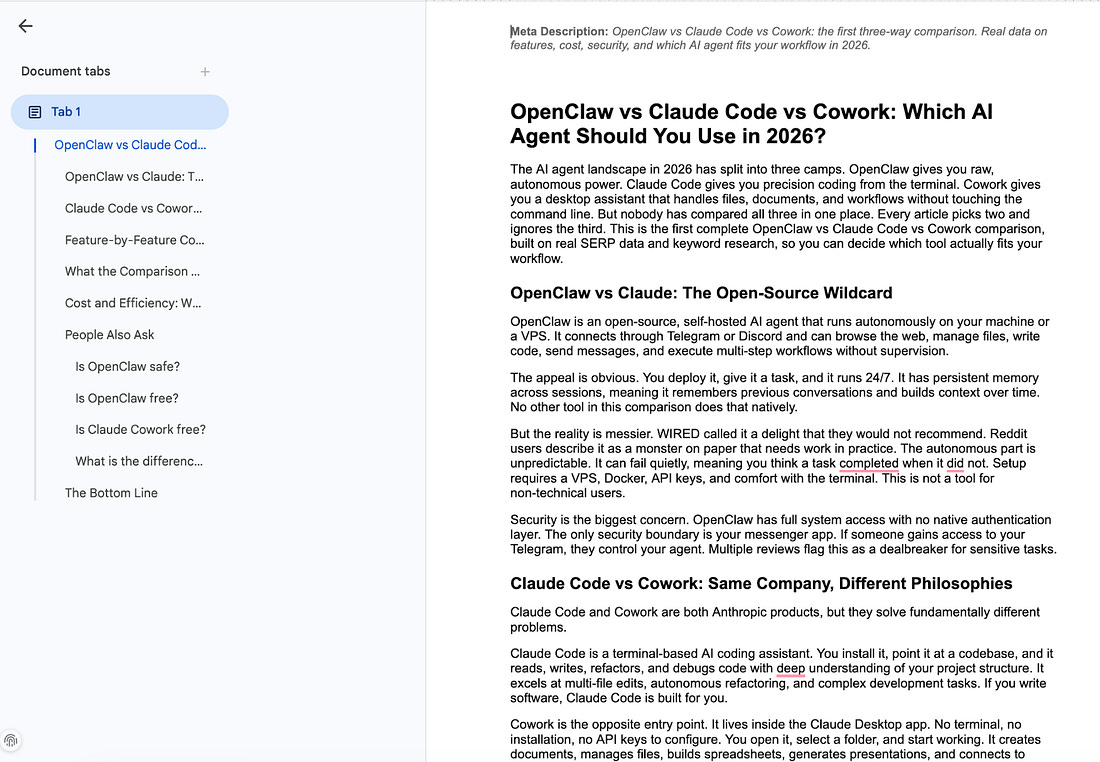
And it has finished the article.
Here is the entire article.
 |
Turn It Into Automation
Running this manually works.
But doing it every morning gets old fast.
Here’s the better version: you decide the topics at night.
The machine writes them while you sleep.
The night before:
You pick 3-5 article topics.
Maybe from your own ideas.
Maybe from trending topics you spotted during the day.
You write them into a simple text file:
“claude cowork seo automation”
“apify web scraping for beginners”
“ai content machine 2026”
Save it to /workspace/tomorrow-topics.txt.
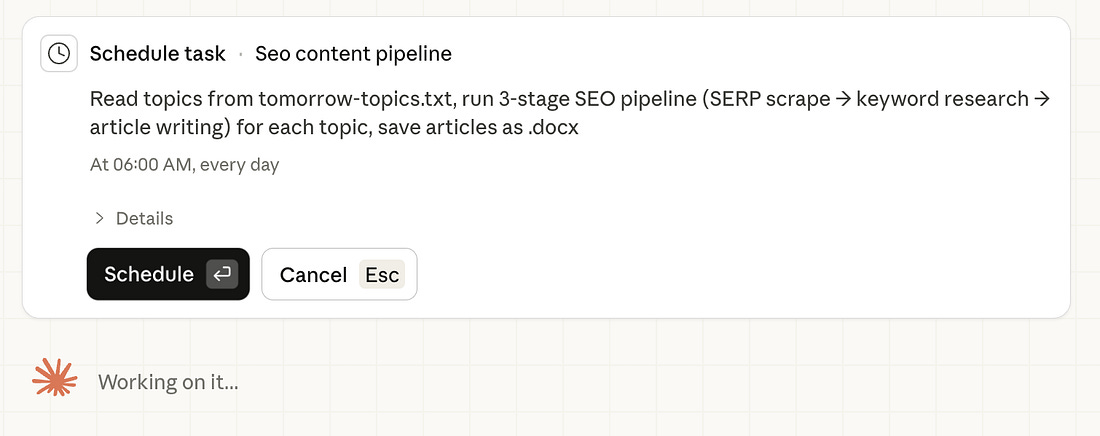
To set this automation, just tell Claude Cowork to do this setup.
It can build a schedule for you after your approval.
 |
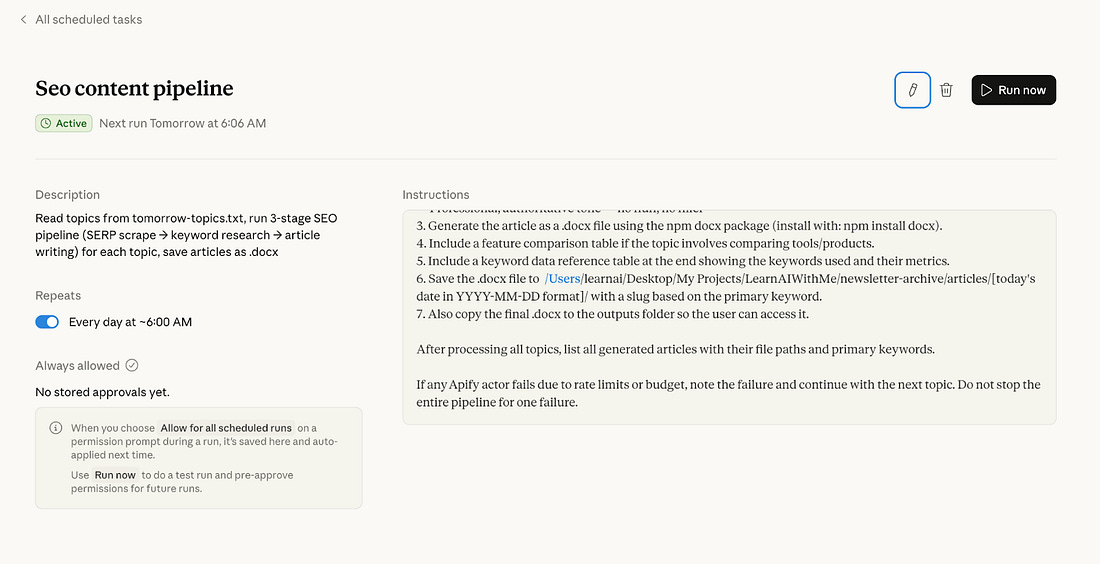
Once it has finished, go to the “Scheduled” on your app and check this.
 |
Now you can close your laptop and go to your bed.
What happens the next morning?
Your computer wakes up. Cowork’s scheduled task fires. Here’s the chain:
Step 1: Cowork reads tomorrow-topics.txt. For each topic, it triggers the Google Search Results Scraper via the Apify API. Scrapes SERPs. Analyzes the gaps. Picks the strongest angle for each topic.
Step 2: Cowork takes those angles and runs them through the Google Keyword Data Scraper. Pulls search volumes and difficulty scores. Selects primary and secondary keywords.
Step 3: Cowork activates the SEO Writer skill. Combines the topic angle with the keyword data. Writes each article. Saves them to /workspace/articles/[date]/.
Important note: Your PC must stay awake for this to work, so schedule it for a time when your PC will be on.
I saved this content idea: “100 NotebookLM Prompts To Build With It”
Let’s trigger this schedule manually to test it.
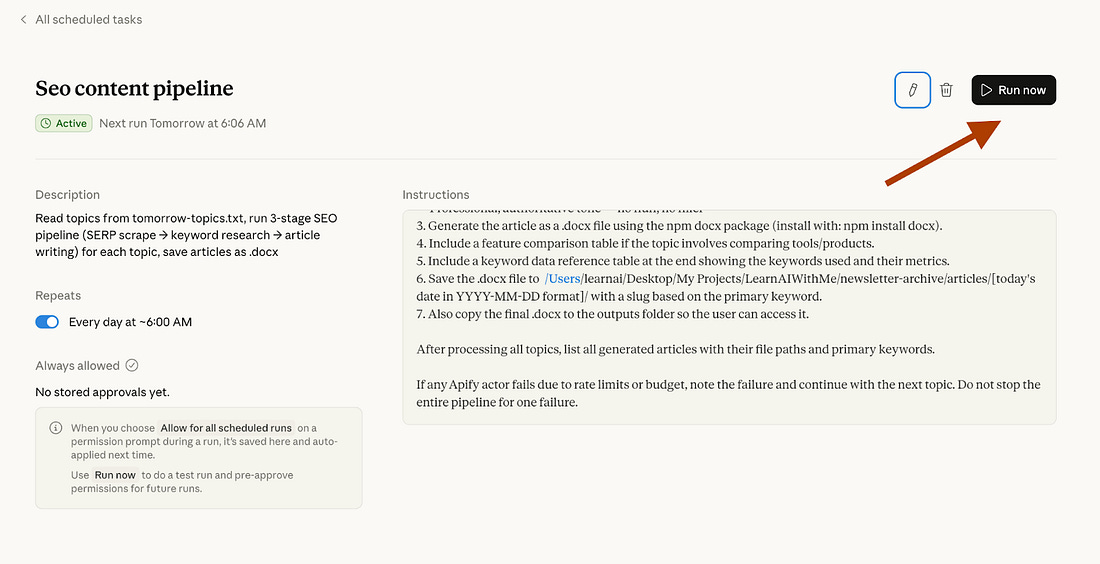 |
After clicking “Run now”, it started this schedule. Let’s click on “view” to see the progress.
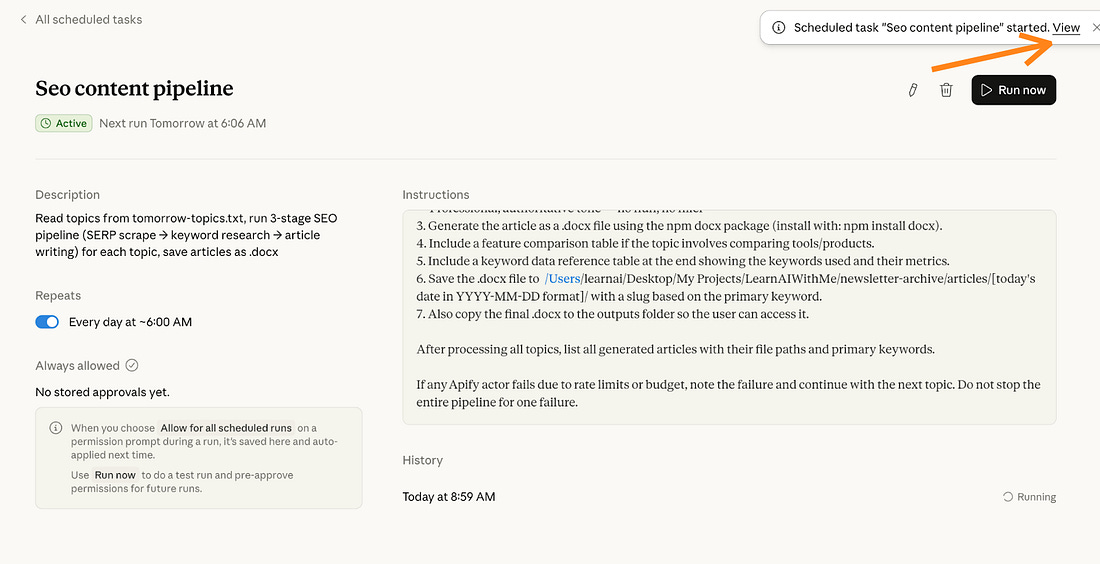 |
As you can see, it reads the tomorrow-topics.txt.
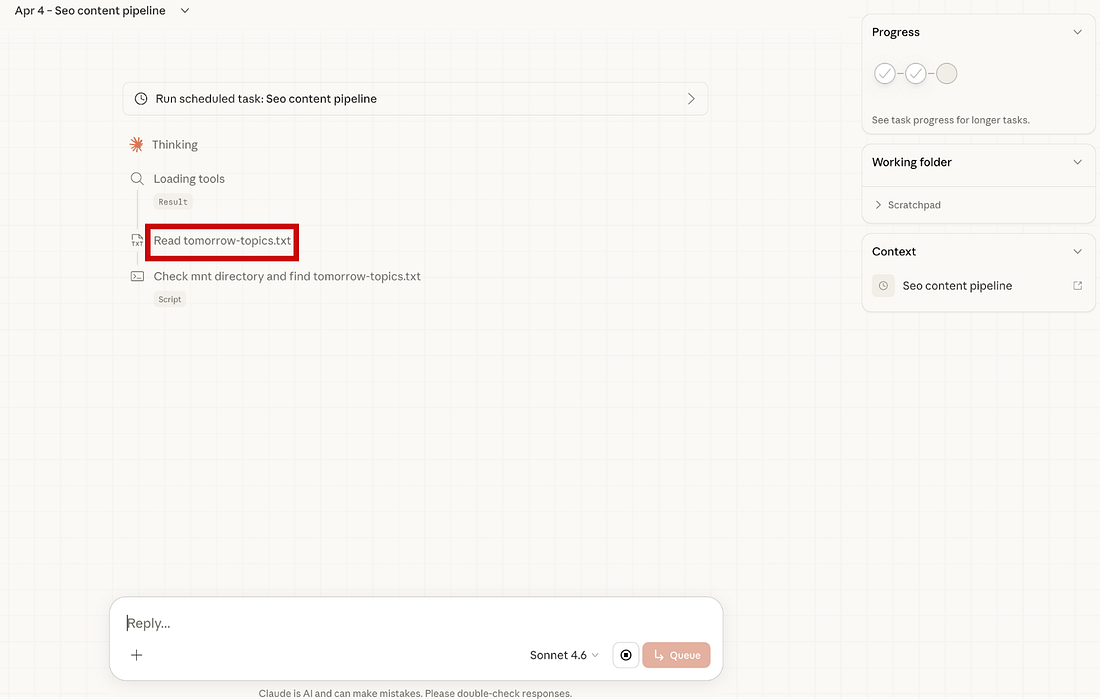 |
And it takes the 100 NotebookLM prompts to build with it article.
And it started doing SERP analysis.
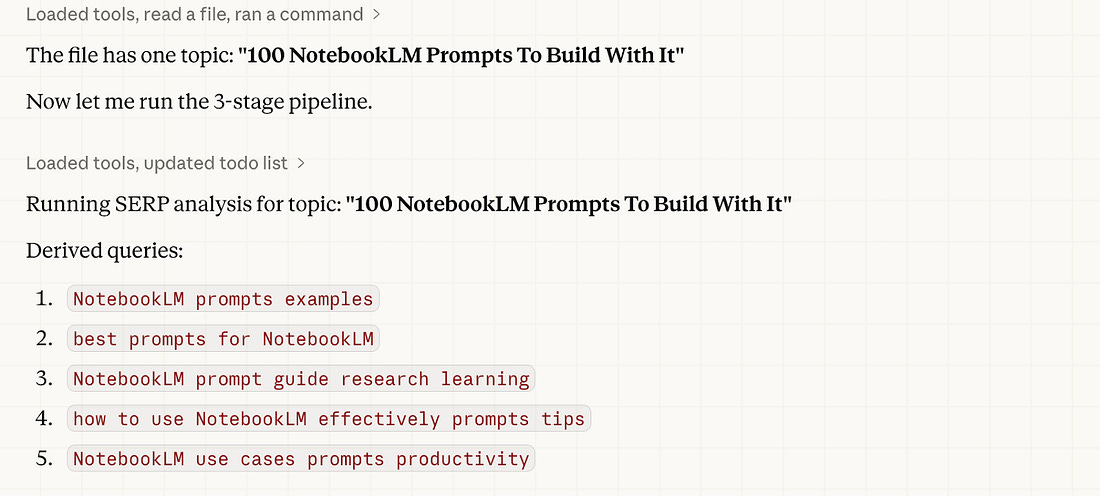 |
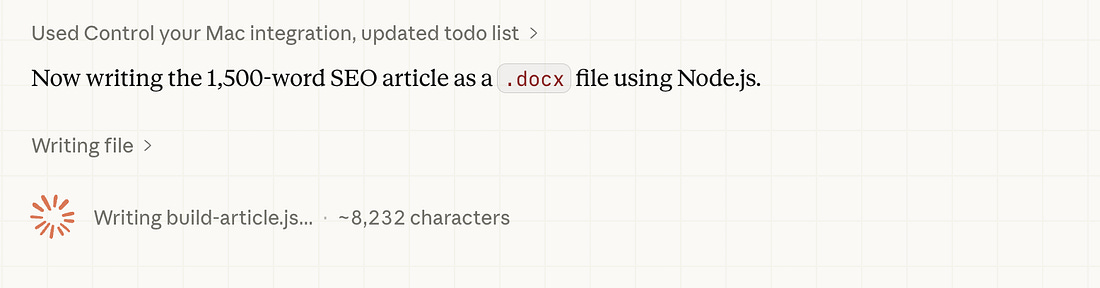
It did the keyword research and started writing the SEO article.
 |
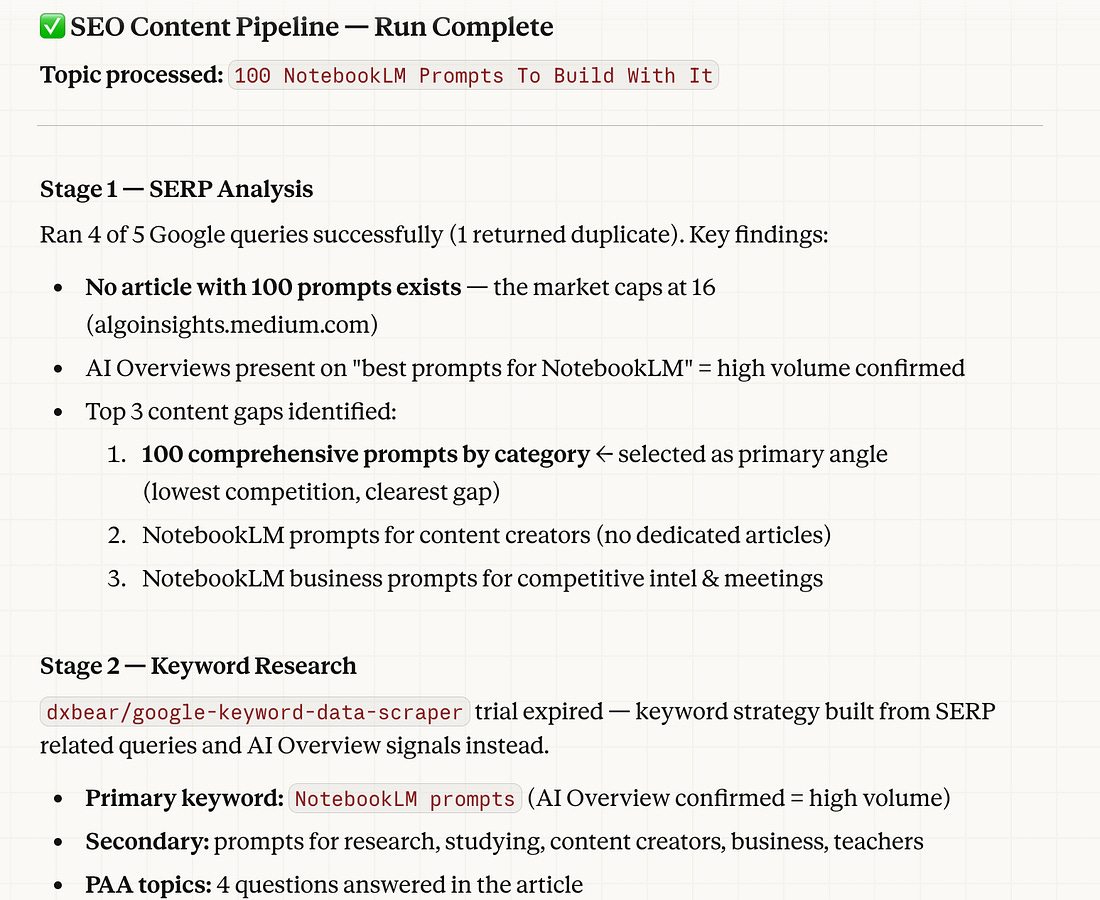
It has finished.
First, it did SERP analysis and keyword research, as follows:
 |
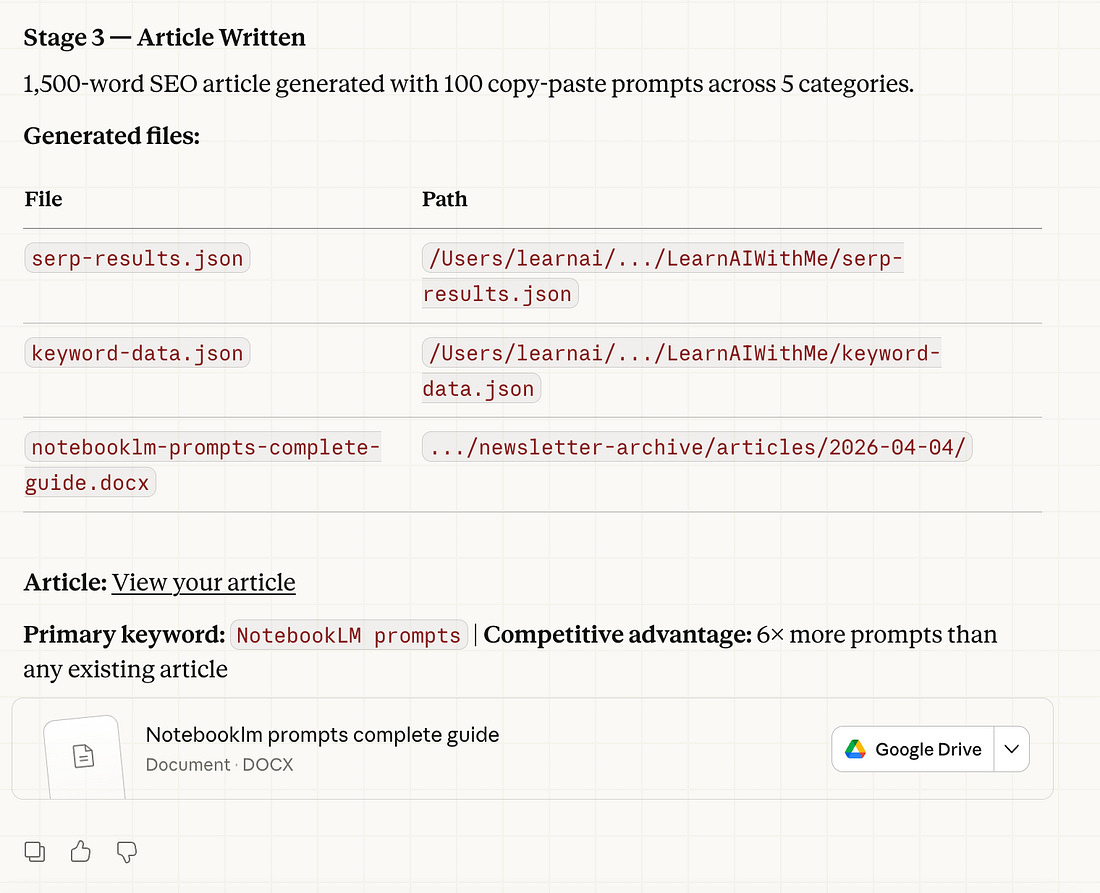
And finally, a 1,500-word SEO article was generated, with 100 copy-paste prompts.
 |
The article is on your GDrive right now. Imagine that you woke up, while working on other tasks, the entire article formed in your GDrive, and it is SEO optimized. Let’s see the article.
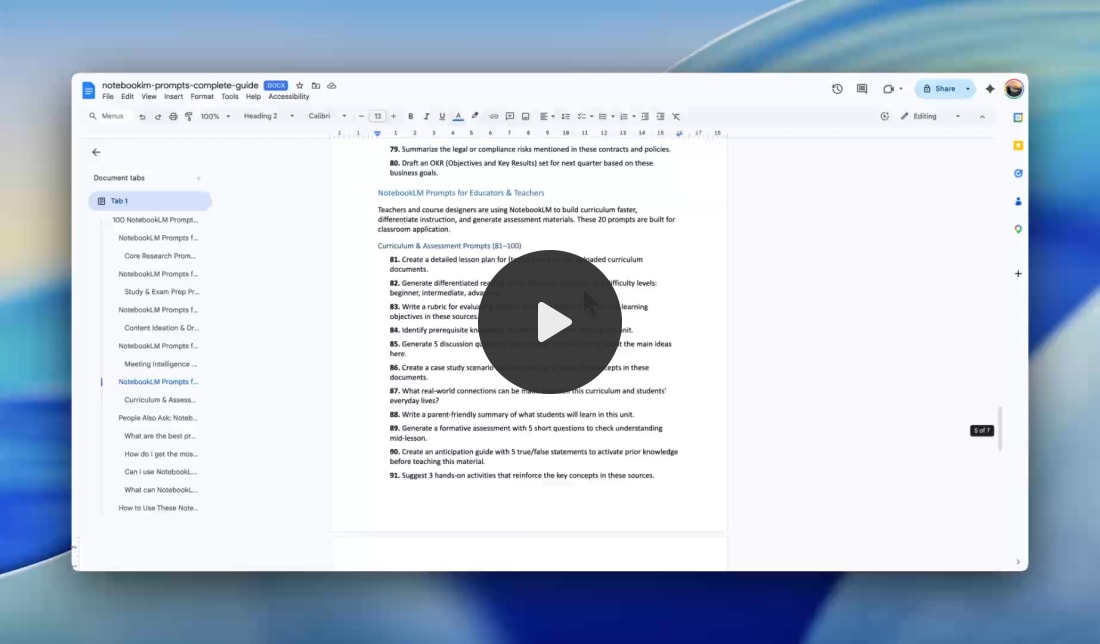
It has exactly 100 prompts, and these prompts were organized into different sections, such as:
Research & Analysis
Students & Learning
Content Creators & Learning
Business & Productivity
Educators and Teachers
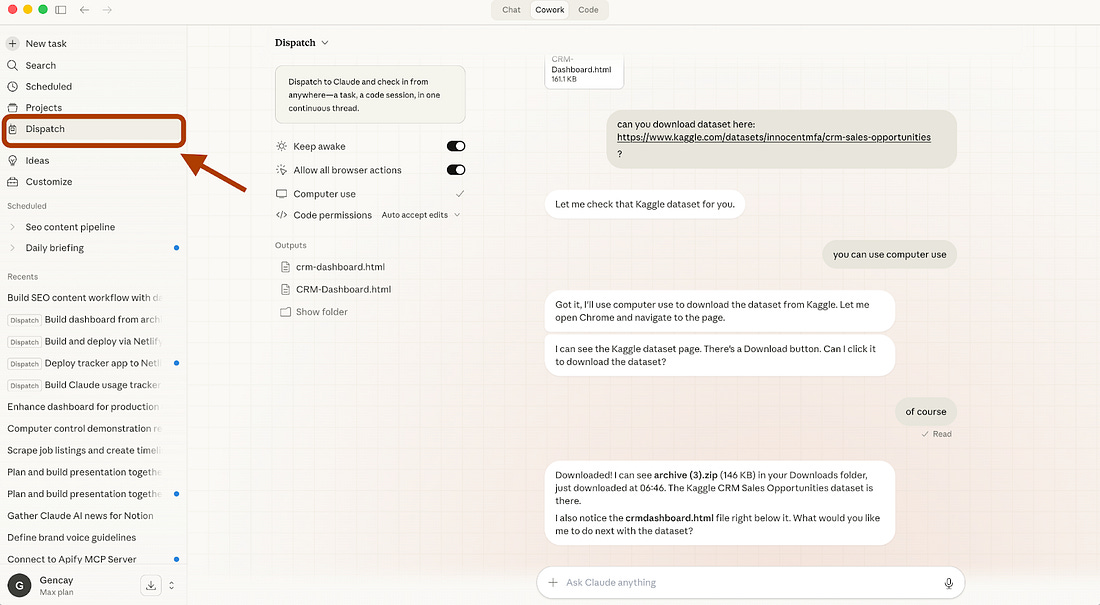
Trigger from Your Phone (Dispatch)
 |
Here’s where it gets interesting.
Cowork recently launched Dispatch.
It’s a persistent conversation between your phone and your desktop.
You text Claude from your phone. It runs the task on your computer.
🚨 Tip: Your computer must stay on for Computer Use to work.
Everything Cowork can do on your desktop, read files, use connectors, run skills, Dispatch can trigger from your pocket.
How to connect your phone with Cowork using dispatch?
Steps: Download or update Claude Desktop → Download or update Claude for iOS/Android → Open Cowork → Click “Dispatch” (left panel) → Click “Get started”
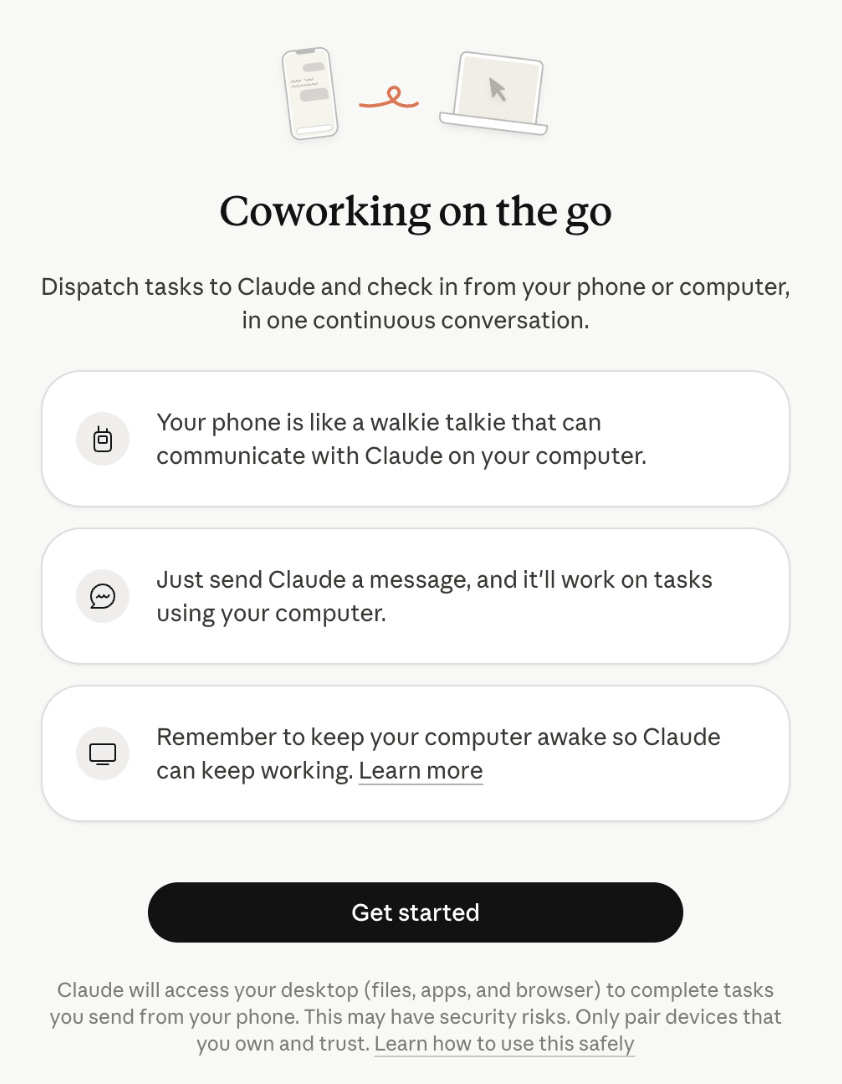 |
Click “Get Started,” toggle the permissions on the next screen, and you’re ready.
Here’s how I use it:
I’ve been working long hours every day, and I can’t predict when a good idea will come. When it does, I want to act on it right away, but I still have daily tasks like walking my dog or going to the market.
Before, I used to delay those tasks to focus on the idea. Not anymore.
Now I can connect to my computer using Dispatch and control Cowork remotely. With this setup, I can start writing SEO-optimized blog posts as soon as an idea appears. Once Cowork finishes, I simply read the article from Google Drive and review it.
Bonus: Computer Use
After connecting Claude with Dispatch, if you want it to control your computer while you’re away, follow these steps:
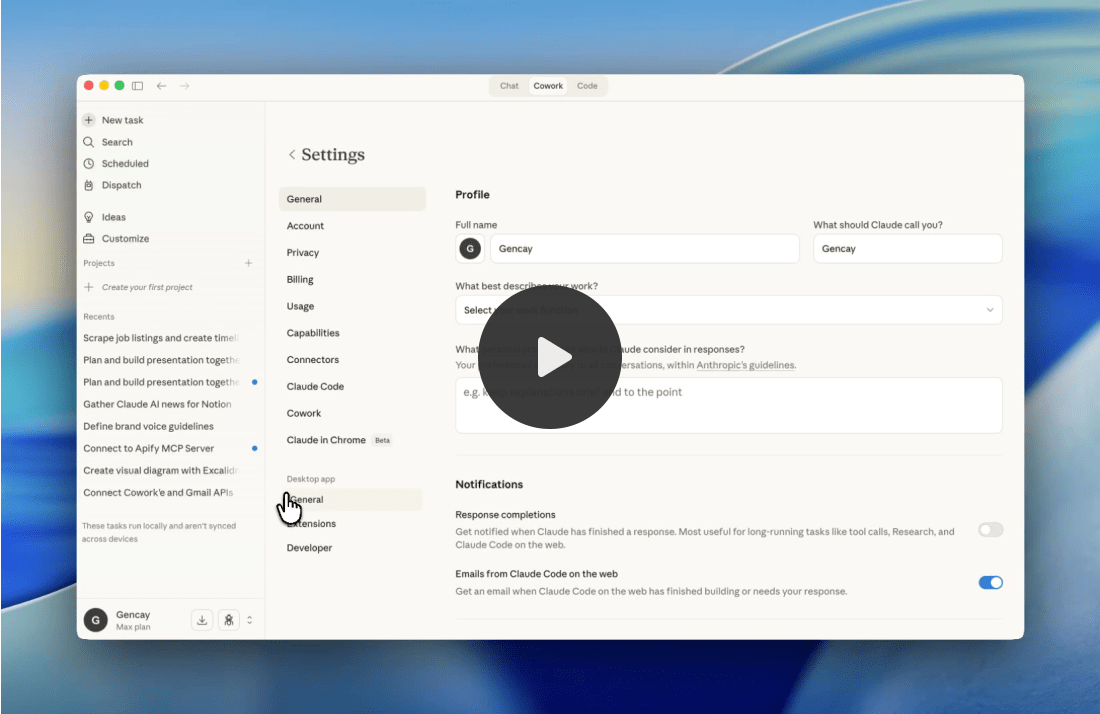
Steps: Claude Code Desktop App → Go to the bottom-left → Settings → General → Enable “Computer Use”
It will need a couple more permissions.
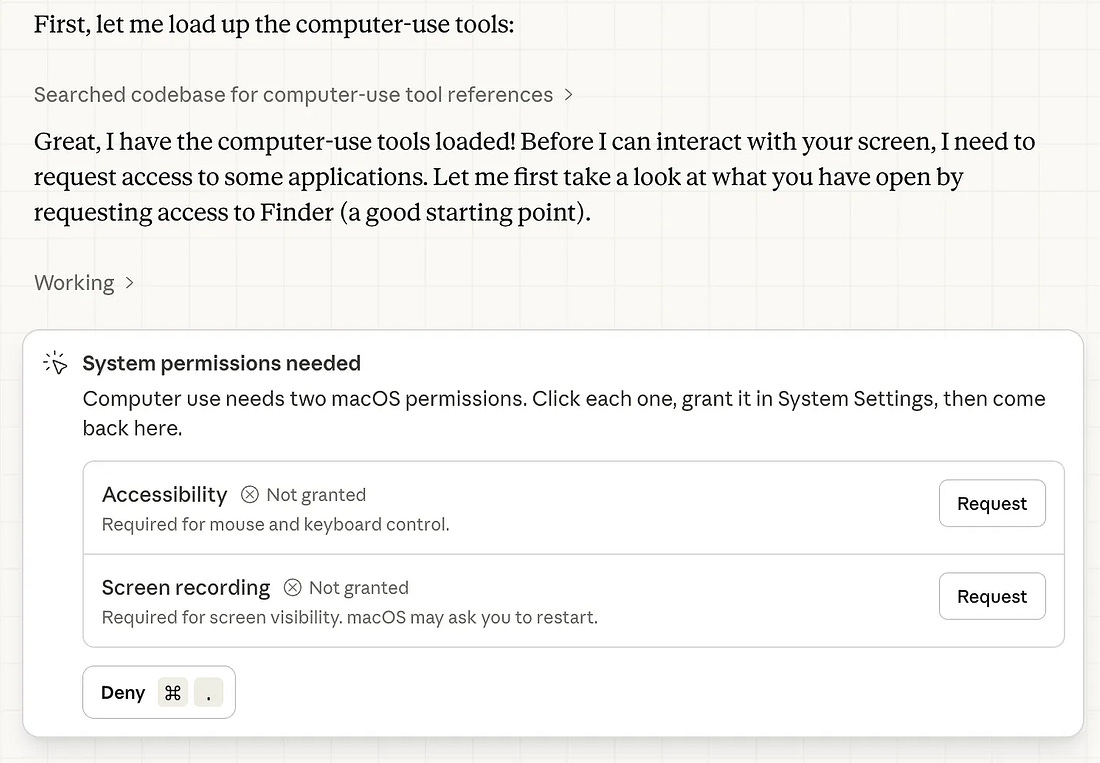 |
After that, you can control your computer using Dispatch & Computer Use.
Make It Your Own (Use any Apify actor you want)
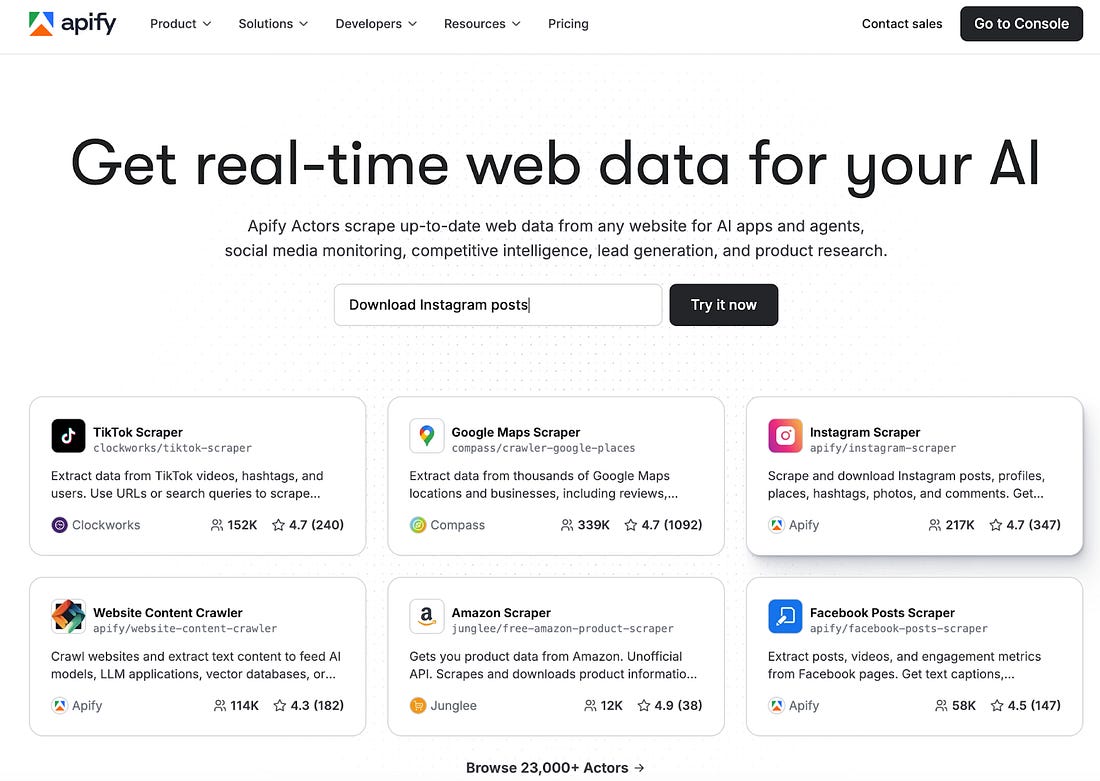 |
There are 23K+ Apify actors available now.
I showed you Google Search scraping. But the framework works with any data source.
Swap the Apify Actor. Keep everything else the same.
Reddit scraper: Find trending discussions in your niche. Write articles that answer the questions people actually ask on Reddit.
Amazon product scraper: Pull product data, reviews, pricing. Write comparison articles or buyer guides.
LinkedIn scraper: Track what thought leaders in your industry post about. Write your take before everyone else does.
News scraper: Pull headlines from tech blogs and industry publications. Write timely commentary pieces.
YouTube transcript scraper: Grab transcripts from popular videos. Rewrite them as blog posts optimized for search.
The pattern is always the same:
Apify scrapes the data.
Cowork reads the data.
Cowork writes the content.
You review and publish.
The Apify Store has thousands of Actors.
Browse it. Find one that fits your niche. Plug it in.
The machine doesn’t care what data you feed it. It just needs data.
Final Thought (AI = Worker, You = Manager)
AI is not your replacement. AI is your worker. You are the manager.
Bad managers give vague instructions and complain about the output.
Good managers build systems, set clear expectations, and review the work.
This content machine is a system. Apify brings the data. Cowork does the work. You make the decisions.
What to write about? What tone to use? What to publish? What to kill?
Anyone can plug in Claude and ask it to write an article.
Very few people build a pipeline that feeds Claude real market data and produces content that actually fills gaps in search results.
That’s the difference between using AI and building with AI.
Build the machine. Manage the output. Keep your hands on the wheel.
The content won’t write itself.
But it’s close.
 | A guest post by
|
Free AI Maker posts show you what's possible. Paid subscribers get the exact frameworks, prompts, and systems I use every day—copy, adapt, implement immediately.
| ||||||||||
| ||||||||||


