

Living at the edge of AI is bittersweet. You can spend weeks building a workaround to a problem only for a frontier lab to swoop in and solve it for you in a more elegant, reliable way. Today, senior applied AI engineer Nityesh Agarwal explains how Anthropic’s dynamic workflows feature made his elaborate Claude setup look clumsy in retrospect, the Every team shares which corners of the AI frontier they’ve given themselves permission to ignore, and executive operations manager Jalaiyah Bolden walks through her step-by-step process for turning a Slack bot into a reliable coworker.
Every is off tomorrow for Juneteenth; we’ll be back Sunday. Was this newsletter forwarded to you? Sign up to get it in your inbox.
Mini-Vibe Check: Dynamic Workflows
A closer look at how Claude Code coordinates multiple agents
When senior applied AI engineer Nityesh Agarwal built Every’s AI project manager Claudie, he spent days figuring out how to get around the model’s limited context window, or the cap on how much text an LLM can process at once—and the reason Claudie kept dropping key details. His solution: one coordinating agent that delegated tasks to fleets of subagents, which gathered data, made updates, and communicated with one another via local markdown files. The process was “a little bit hacky,” Nityesh says, but it worked.
If he were to build Claudie today, he could just use dynamic workflows, Anthropic’s feature for orchestrating large, multi-agent Claude Code tasks. Instead of deciding each step on the fly, Claude writes a reusable script that coordinates the work. It can assign tasks to many subagents and have them check each other’s work before reporting back the results.
Attio is the CRM for teams that set the pace
It compounds every customer signal into context, then acts across your funnel to let you move at unmatched speed and scale. With agents and automations that build pipeline, chase signals, and move deals forward, Attio orchestrates your revenue work around the clock.
Loved by high-growth startups like Granola, Modal, and Wispr Flow, Attio amplifies what you can achieve.
Before dynamic workflows, trying to get Claude to reliably spawn reviewer agents was a persistent headache. Anxious about token spend, the model “would sometimes try to merge it all into one subagent,” Nityesh says, dragging down the quality of the results. Increasingly dramatic directives not to do this often went unheeded. Now, if you tell Claude you want three verifier subagents with dynamic workflows, Claude will write a script that generates three subagents every time.
Nityesh is grateful for the new feature, but watching weeks of work get negated by a single release was also disheartening. “I spent so many weeks building that other thing. Now it’s useless,” he says.
“But that’s the cost of being at the frontier,” he continues. “You need to be ahead of everybody else, and sometimes that means you need to throw away your past work.”
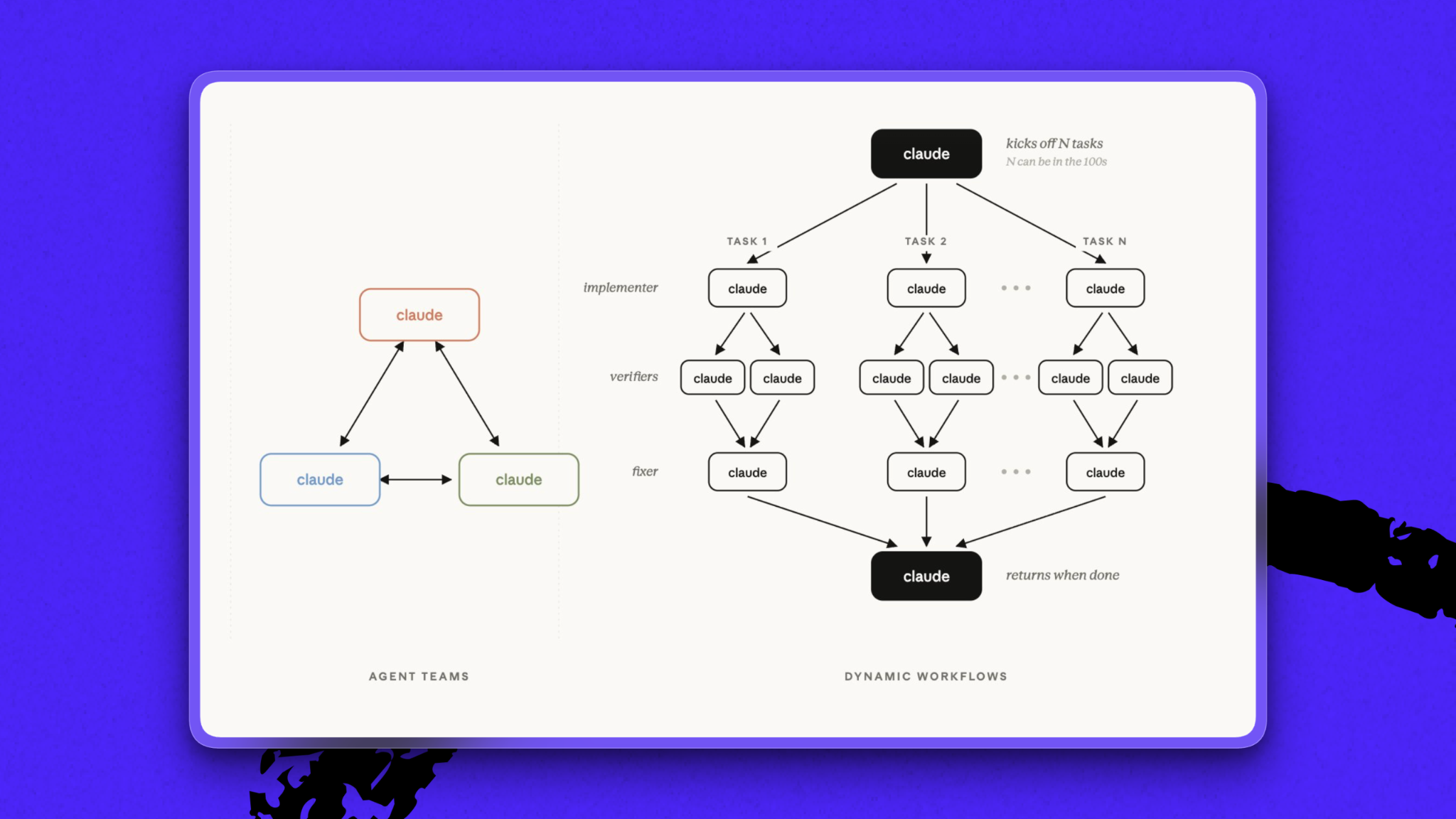
A dynamic workflows case study. For Spiral’s redesign, senior designer Daniel Rodrigues sent the writing app’s general manager Marcus Moretti a giant Figma file.
Marcus needed to convert the file into code. He did a pass in Claude Code, but the result had numerous errors. Before dynamic workflows, he would have flagged the mistakes in batches for Claude Code to fix—a repetitive, frustrating process.
Instead, Marcus asked Claude Code to set up a dynamic workflow that would review the Figma file section by section, extract all assets and design details, turn them into code, and check the results against the original file.
The Figma file had 11 sections, so Claude spun up 11 tasks, each with dedicated subagents. After running for a couple of hours, “it was not perfect,” Marcus says, but “it saved me a whole bunch of time.” Before dynamic workflows, each of the reviewer subagents would have been Marcus himself.
Try it yourself: For complex projects like a code migration, changing the programming language a product uses, or a major upgrade, dynamic workflows might be a good solution, Marcus says. To initiate the feature, you can simply type “workflow” in a Claude Code session, or include “ultracode” in the prompt.
Or test out Nityesh’s prompt for kicking off a dynamic workflow.
Permission to skip
Rapid-fire roundup edition
The pace of AI is unrelenting. Each week brings new model releases, benchmark results, and “paradigm shifts” that sometimes turn out to be incremental upgrades.
At Every, we do our very best to stay at the frontier—but for better and worse, we are human, which means we cannot run all night. Here, Every staffers share what they’ve given themselves permission to skip in order to, you know, sleep, touch grass, or run other AI experiments. [Disclaimer: All of this is, of course, subject to change!]
Mike Taylor, head of tech consulting: “All model releases that didn’t come from Anthropic or OpenAI.” Exhausted from putting Fable 5 through its paces, Mike recently declined the chance to beta-test a model from another big tech company. “Maybe I’m stupid for saying this, but I don’t expect it to be as good as what we’re currently testing,” he says. “I might just not be able to make the time. Whereas if it’s something I think is really, really good, then I’ll miss my kid’s birthday party to test it.”
Kieran Klaassen, general manager of Cora: “Open-source models. There are so many, and they’re not as good as the best models, so I skip all of them.”
Willie Williams, head of platform: New, complex development workflows—compound engineering has cured his FOMO when he encounters them on X. “I just use the /lfg workflow from compound engineering,” he says. “Now I’m like, ‘It’s all I need.’”
Daniel Rodrigues, senior designer: Agent-ready design systems, in which you translate brand assets and design decisions into code an agent can use. He sees the value in this way of working, particularly on the client side, but building these complex systems is not how he’d choose to spend his time if given the choice. Why? “It doesn’t look fun, and design should be fun,” he says. Amen.
Steal this workflow
Treat your Slack bot like a coworker
Jalaiyah Bolden is Every’s executive operations manager: She manages CEO Dan Shipper’s calendar, internal events, operations projects, and customer support. Her small but mighty teams use a number of Slack-based agents—most notably Viktor— to automate or assist with the myriad tasks regularly thrown at them.
Here’s Jalaiyah’s step-by-step process for getting an agent to take over routine tasks such as auditing ticket closures, creating discount codes, or compiling payment dispute evidence.
- Pick one recurring job. Start with something low-stakes but annoying. Anything that comes across your desk more than once could qualify: Maybe it’s a templated but extensive weekly report, or a customer support audit, or a workflow to create coupon codes. Whatever it is, make sure the agent has access to the systems it needs to find or verify information, and then describe the output you want. For example: “Audit Fin [formerly Intercom, a customer support platform] closures from the last 12 hours and flag anything suspicious.”
- Start a conversation. Treat the bot like a new hire. Jalaiyah’s go-to prompt: “What other information do you need to be able to make this repeatable and consistent over time?” Let the agent ask clarifying questions, then give it rules, examples, edge cases, and a clear definition of what “good” and “bad” look like.
- Review and revise what it comes back with. Let the agent gather information and draft a response. Then review the result yourself, explain what needs to be handled differently, and fill in any information gaps. The result should improve the next time around.
Try it this week: Choose one recurring task and ask your agent: “What other information do you need from me to run this reliably every week?”
One last thing
Mistral who?
When it was announced the heads of the top AI companies would convene in person at the G-7 Summit to discuss the “opportunities and dangers” poised by the technology, the lineup was who’d you’d expect: OpenAI CEO Sam Altman, Anthropic CEO Dario Amodei, Google DeepMind CEO Demis Hassabis, Meta chief AI officer Alexandr Wang, and Arthur Mensch, the CEO of Mistral.
If you’re wondering how Mistral made the cut, you’re not alone. A French maker of open-source models, Mistral is “among the most vaunted artificial intelligence firms in Europe,” per the New York Times. But on X, the company is perhaps more famous for “Le Chaton Fat,” a spoof all-powerful model that went viral online after Mistral announced it was renaming its chatbot from Le Chat to Vibe, leading commentators to post about other potential cat-themed successors to Le Chat.
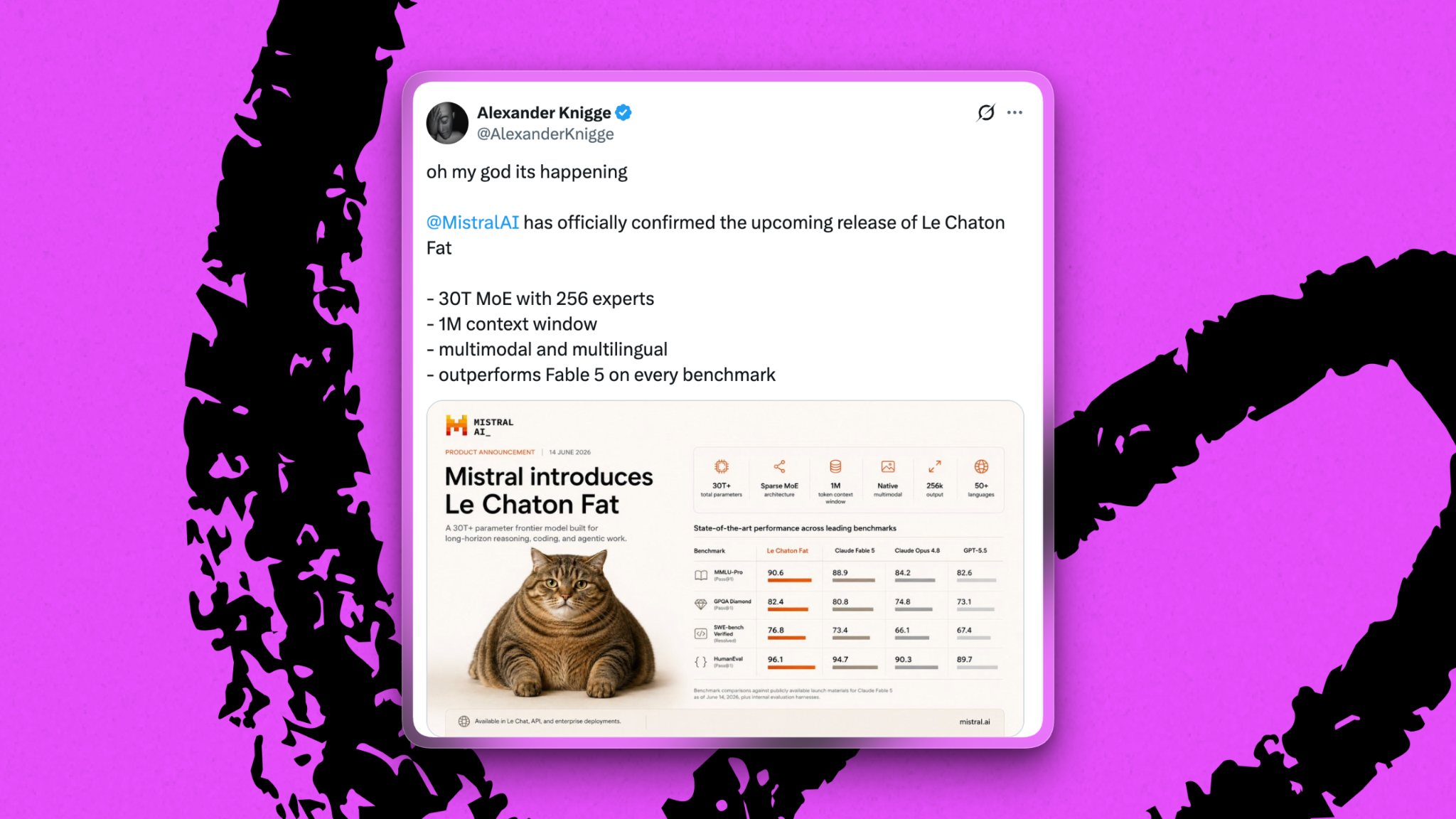
We still don’t know exactly what was discussed in the AI huddle, but Mistral’s inclusion led to, you guessed it, more memes.
Laura Entis is a staff writer at Every. You can follow her on LinkedIn.
To read more essays like this, subscribe to Every, and follow us on X at @every and on LinkedIn.
We build AI tools for readers like you. Write brilliantly with Spiral. Organize files automatically with Sparkle. Deliver yourself from email with Cora. Dictate effortlessly with Monologue. Collaborate with agents on documents with Proof.
For sponsorship opportunities, reach out to sponsorships@every.to.