

Was this newsletter forwarded to you? Sign up to get it in your inbox.
Introducing Monologue Notes
Today we’re launching Monologue Notes, which turns your calls, meetings, and voice memos into transcripts your agents can use. Naveen Naidu built Monologue to capture active work, where text has a clear destination. In six months it’s logged five million dictations and 250 million spoken words. Now, Notes captures the rest: the thinking that happens on walks, in calls, and in meetings. It transcribes everything and makes it available to any agent with API, CLI, or MCP access, across your Apple devices.
Mini-Vibe Check: Claude Design
Anthropic recently launched Claude Design, a web-based tool that lets you feed Claude a GitHub repo, Figma file, or brand kit and collaborate on interfaces, prototypes, slides, and one-pagers. It’s powered by Claude Opus 4.7 and lives only in Claude.ai.
The stock market read Claude Design as a threat to Figma, the incumbent design tool. But traders are not designers. Having played around with Claude Design, Every’s creative director Lucas Crespo characterizes Figma’s sliding share price as “a Wall Street reflex from people who have never opened either tool.”
Claude Design can do a lot well, but it wasn’t built for designers.
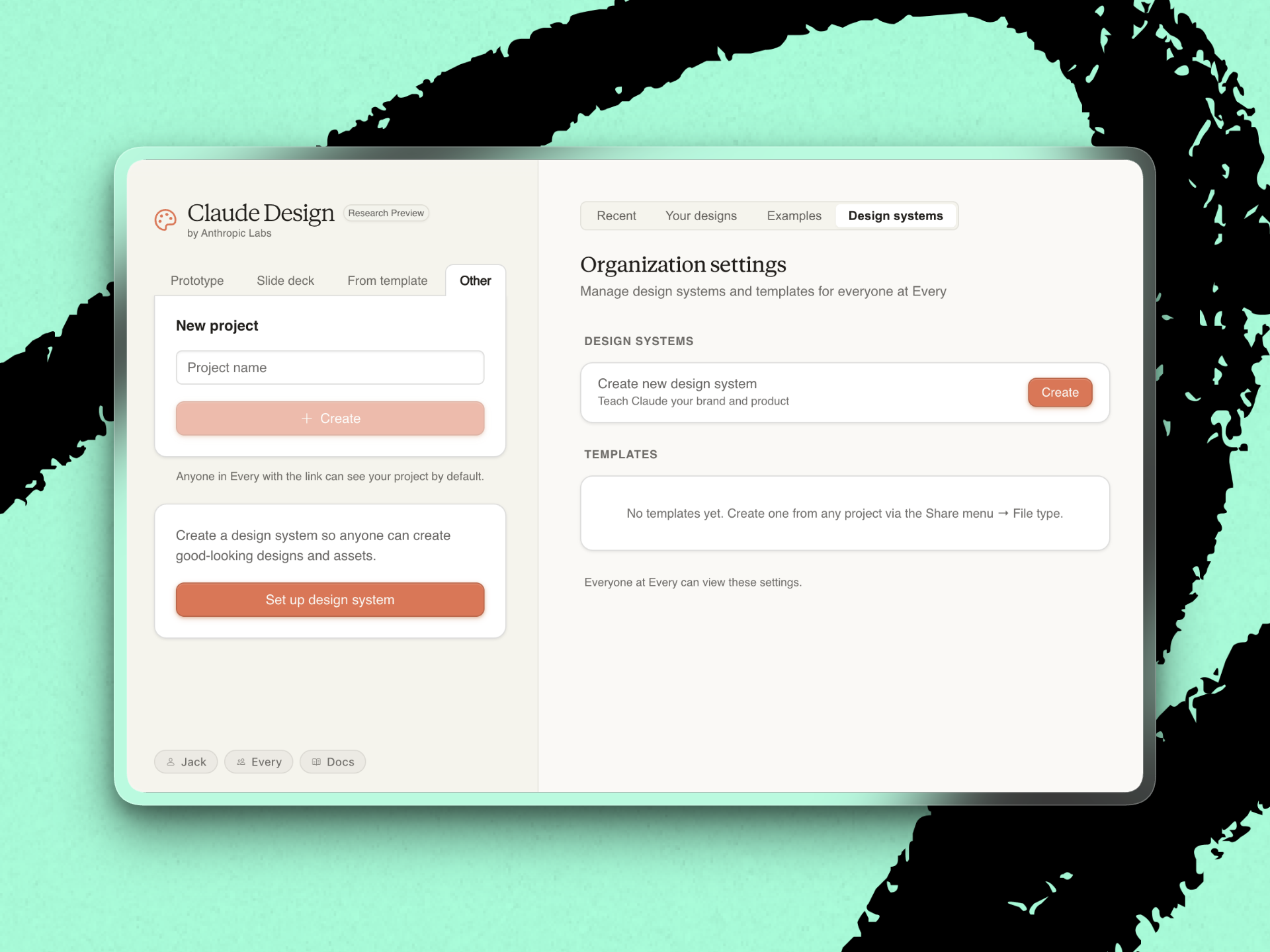
What works: Point Claude Design at a GitHub repo and it will extract a starting design system—the colors, typography, and reusable components that give a product its look. Non-designers can then extend that system. If head of growth Austin Tedesco wants to ship a careers page or a YouTube thumbnail in Every’s style without bothering the design team, Claude Design is the tool for the job.
Claude Design’s live, generative interface is also a nice touch, Lucas says. The tool starts by asking you questions—layout density, accent color, whether to animate emojis—and you can draw or leave comments on top of the output, or click a specific element and edit it in place. The sketch-on-top feature is the closest Claude Design gets to feeling like Figma.
What could be better: The menu-driven interaction. Creating in Claude Design means answering a series of text prompts about layout, tone, and color, and reacting to what the tool produces. “It feels like we’re filling a bunch of forms—design is supposed to be fun,” Lucas says.
This prompt-and-react loop works for extending or revising an existing design system. But it isn’t well-suited for starting something from scratch—design is “50 percent exploration,” Lucas says. In Figma, you start with a blank canvas, and your output is shaped by a series of decisions—drag a shape, snap it to a grid, change a drop shadow, compare three variations side-by-side. Claude Design turns the open-ended exploration into reactions to what it’s already made.
The fragile setup. During a demo, we struggled to link Every’s GitHub repos and upload Figma files. And because Claude Design is web-only for now, there’s a literal disconnect from your local files and Model Context Protocols (MCPs).
Final verdict: Claude Design is great for teams that want to empower non-designers to create their own assets in the house style. But it’s not yet where a designer goes to build something new.—Laura Entis
Take full ownership of your digital privacy
Ever look yourself up and find databases of personal information you didn’t consent to? That information should belong to you, not to data brokers who make money off selling it without permission. With DeleteMe, privacy experts remove your data from hundreds of broker sites, send you a detailed report showing exactly what was cleared, and monitor websites continuously all year to keep it that way. Reclaim your privacy and keep it protected.
Signal
Two new ways AI tools can leak your data
Two AI-tool security stories broke inside 24 hours over the weekend. They reveal two different points of failure in AI security: one where the attack surface was the vendor, and one where it was the AI’s output.
What happened: On Sunday, Vercel, an infrastructure company behind a big chunk of the web, confirmed a breach. Except the break-in didn’t start at Vercel but at a third-party tool called Context AI. The attackers used the hacked connection to climb into a Vercel employee’s Google workspace account, then their Vercel account, and finally into customer data—including the private passwords and credentials that customers’ apps use to connect to their payment systems, databases, and other services.
Then on Monday, vibe coding platform Lovable did damage control after users started warning each other that apps built on the platform were leaking their users’ data to the public internet. The issue turned out to be in the permissions: A basic database rule, “a customer can only see their own records,” was turned off by default in the apps Lovable generated.
Why it matters: Every AI app your team signs up for is a new door into your company. If the vendor gets hacked, the keys they were holding—to your email, your calendar, your codebase—walk out with the attackers. You inherit that vendor’s security posture even if your IT team didn’t pick the tool.
And when an AI writes your app for you, your app inherits the AI’s defaults. There isn’t always someone looking over the generator’s shoulder to check whether those defaults are safe. “I vibe-coded a prototype” now means “I shipped something protected by whatever rules the generator thought were fine.”
What to do this week:
- Take stock of every AI app your employees have connected to a work account. Then turn on two-factor authentication everywhere it isn’t already on.
- Before you ship anything an AI built—even a weekend prototype—ask the generator one question: “What is this app exposing to the public internet, and should it be?” If you can’t get a clear answer, don’t ship.
- For anything touching customer data, like a CRM or billing system, pair the AI with a tool designed for a safer-by-default posture. Anthropic’s recently launched Managed Agents, for example, runs each session in a sealed-off computing environment with credentials held outside the sandbox.
Steal this workflow
Give your agent its own X feed to watch for vulnerabilities
You can’t personally stay on top of every vulnerability that might hit the AI stack you’re building on. Every AI engineer Nityesh Agarwal decided to stop trying, and assign situation monitoring to an agent that doesn’t sleep.
The workflow:
- Create a dedicated X account for your agent. Nityesh made one for Claudie, Every’s consulting project manager agent, and had her follow the AI security people he’d otherwise be glued to—Anthropic researchers, independent researchers who probe systems for weaknesses, and vulnerability-disclosure accounts. The dedicated account only reads posts, and doesn’t otherwise participate in discussions.
- Schedule daily jobs that scan its home feed and flag anything that looks like a disclosure. Use this prompt: “Read my X home feed from the last 6 hours. Flag any posts reporting vulnerabilities, Common Vulnerabilities and Exposures, breaches, or exploits relevant to the AI stack we use (Claude, Anthropic APIs, OpenClaw, Railway, Vercel, Supabase, our MCP servers). For each, give the source post URL, affected system, severity if stated, and one-line summary.” Run it at 6 a.m., noon, 6 p.m., and midnight.
- Route flagged items to a team Slack channel. Nityesh has Claudie post to an internal channel so anyone can see what broke overnight. Add a one-word tag per item (critical / watch / fyi) to make messages easy to scan.
Try it this week: Spin up an X account, follow 10 AI security researchers, and schedule a recurring Claude Code job with the prompt above.
Discuss
“Cybersecurity is proof of work now. You don’t get points for being clever. You win by paying more.”—Drew Breunig, writer and technology strategist
AI has gotten good enough at finding software vulnerabilities that security has turned into a spending contest between attackers and defenders. Both point AI at your infrastructure looking for ways in. Whoever runs more scans wins.
That adds a third step to shipping code. You write it and review it—and now you harden it. You point a model at your own system and let it hunt for exploits until you run out of budget. If you’re shipping anything that touches customer data, assume an attacker is already running that third step against you. The only question is whether you’ve run it first.
Inside Every
Star Wars got it right
To me, a lot of the charm of the original Star Wars trilogy comes from the decided lack of remote networking. They can’t hack the Death Star so Obi-wan has to cross the narrow bridge deep in the starship’s bowels to get to the terminal to flip the switch to turn off the tractor beam.
I used to think this was a relic from the pre-internet days when the films were made. But with frontier models growing increasingly more capable at exploiting security gaps, it might be a short time from now in this galaxy. Anything of critical importance will live offline.—Jack Cheng
Katie Parrott is a staff writer at Every. You can read more of her work in her newsletter.
We build AI tools for readers like you. Write brilliantly with Spiral. Organize files automatically with Sparkle. Deliver yourself from email with Cora. Dictate effortlessly with Monologue. Collaborate with agents on documents with Proof.
For sponsorship opportunities, reach out to sponsorships@every.to.