

Happy Tuesday! Today, we have a mini Vibe Check on a tool for running more than 100 coding agents in parallel. Plus: how to write viral X posts using the secrets of Grok’s algorithm, why Every’s chief operating officer and head of marketing moved their agent work into public Slack channels, and what’s overtaking Markdown as the preferred format for agents.
Was this newsletter forwarded to you? Sign up to get it in your inbox.
Mini-Vibe Check: Gas City
A glimpse of the future that’s not (yet) ready for practical use
Earlier this year, prominent software engineer Steve Yegge published a viral Medium post about Gas Town, an open-source tool that let developers coordinate 20 to 30 AI coding agents in parallel on the same codebase. Last week, Every’s head of tech consulting, Mike Taylor, got a peek at the future of multi-agent engineering with Gas Town’s successor project, Gas City. The project was rebuilt as a toolkit with Yegge’s blessing by Chris Sells, a long-time developer-tools veteran who grew Google’s open-source app-building toolkit, Flutter, to 3 million developers, and former Block technical lead Julian Knutsen. Mike joined more than two dozen engineers and chief technology officers who played around with the project at a workshop in New York, with Sells and Knutsen dialing in.
TL;DR: Gas City has some sharp ideas that reflect the direction software development is headed, but it’s not yet ready for prime time.
What is Gas City: Running many coding agents in parallel is table stakes for developers at this point. Getting them to do anything useful requires coordination systems to hand work to each other, review each other’s output, and not step on each other’s branches—and nobody’s quite figured out how to get that right yet. “Software factories” like Gas City are one solution: an orchestration system that hands tasks to a small team of agents, routes their work, and decides what’s done.

With leads, timing is everything
Here’s a common problem: You’re generating interest and people are opting in, but by the time you respond, they’ve already talked to three competitors. HighLevel fixes that. Leads, messages, automations, and pipelines work together in real time, on a single platform. You can respond to new leads instantly, automate follow-ups as soon as someone opts in, keep every conversation in one place, and see exactly where deals slow down. Get faster responses and better outcomes.
Sells and Knutsen use Gas City to build Gas City: Knutsen’s Atlanta-based server runs roughly 100 agents that merge around 50 pull requests per day—the output of a small team—burning through roughly a billion tokens per day, or equal to roughly one-fifth of the English-language corpus on Wikipedia.
What works: There are three ideas from the world of software engineering that Gas City is built on and are worth internalizing, even if you never touch the toolkit.
- Dark factory versus light factory: Parts of your work where humans and agents talk to each other (planning, design, review) stay visible can be thought of as light, and parts where agents grind through clearly defined work on their own stay in the background, in the dark. As you gain trust in the agents’ output, you can move more of your process into the dark.
- One pet, many cattle: The future of multi-agent engineering is likely organized with one persistent, named supervisor you talk to directly (Gas City calls it the “mayor”), who hands tasks to anonymous, disposable workers (the “polecats”) that do one job and shut down, so they execute their job without getting lost in context or in each other’s way. Instead of managing one hundred agents individually, you manage one conversation while the mayor does the coordinating.
- Multiple opinions on every code review: Give the same code to Claude, Codex, and Kimi at the same time for review from multiple angles. Three different models catch different bugs than one model run three times.
What could be better: In Gas City, every task spins up a fresh agent session that doesn’t remember the earlier steps, so agents waste cycles re-reading context that other agents produced and miss connections a single session would have caught. Cost is also a challenge: A six-step job can cost six times the cost of one Claude session, which adds up fast. The toolkit still feels experimental––it took a room full of experienced engineers an entire day to get it running, even with support from the instructors.
Beads, the task tracker powering the system, is built for agents first. It runs on the command line rather than as a visual dashboard, which is fine for agents but harder for humans, who want to see everything at a glance. So teams using Gas City in production typically pair it with Jira or Linear—placing tasks in two places instead of one.
Additionally, Gas City was built on the assumption that AI models need hand-holding to stay on track, but models have gotten good enough that parts of Gas City built to keep models on track, such as review loops to catch mistakes and mid-task check-ins to prevent agents from drifting, are now mostly unnecessary. Finally, Gas City uses deliberately unfamiliar words to refer to different inputs, actors, and workflows—“beads” for tasks, “polecats” for workers, “refineries” for processing steps—so it can be confusing for a team new to the tech.
Verdict: 🟨 Mike Taylor, head of tech consulting: “Learn from the ideas. Skip the toolkit for now.”
If you’re already running more than 10 Claude Code sessions in parallel and reading source code, Gas City is worth a look because it’s one informed opinion on how to handle that level of orchestration. For everyone else, take the ideas and wait. OpenAI’s Symphony, released a few weeks ago, is a more accessible, enterprise-ready version of a similar idea: a written set of rules that turns your existing Linear board into the dashboard the agents work from. This is more in line with the way software engineers work now and doesn’t require the behavior change that Gas City does.
Steal this workflow
Run your X posts past Grok before you post
xAI open-sourced its ranking algorithm last week, which shows the factors X considers when deciding which posts to surface in users’ For You feed. It includes a Grok-powered “banger classifier” that decides whether your post gets better distribution by scoring every post on quality and slop. So why not run the same check on yourself before you hit publish?
- Paste your draft into Grok with X’s scoring prompt. Ask Grok to return four things: quality_score, slop_score, isHighQuality (a true-or-false verdict on whether a post clears the quality bar), and topic tags. The classifier reads text, image, and video. Use this prompt: “Score this X post the way the xai-org/x-algorithm banger classifier would: return quality_score (0–1), slop_score (1–3), isHighQuality boolean, and topic tags.”
- Rewrite anything that scores below 0.4 on quality (which can receive a score of between zero and one) or above one on slop (which is rated between one and three). Posts that users scroll past quickly or report get penalized, while posts that drive replies and dwell time get rewarded. To move the score, lead with a stop-the-scroll first line, name a specific experience, event, or number, and cut anything readers would skim. As soon as a user scrolls past, the algorithm ranks the post as “not_dwelled” and it gets pushed down the recommendation pile.
- Limit yourself to two to three posts a day. The algorithm heavily discounts your fourth post and your eighth to near zero in the ranking system. It’s better to invest in fewer, scroll-stopping, engagement-generating posts than many forgettable ones.
Signal
HTML is the new Markdown
What happened: Until a few weeks ago, Markdown, a lightweight text formatting system, was the be-all-end-all of documentation for AI agents, because agents had been trained on so much of it that they read and write it fluently. Then, on May 8, Anthropic’s Thariq Shihipar published an X post titled, “The Unreasonable Effectiveness of HTML,” that argued agents should produce single-file HTML instead when they create files. The post hit 4.4 million views in 16 hours. Three days later, Andrej Karpathy backed it. Simon Willison, a longtime Markdown advocate, also changed his mind, saying that now that context windows are large enough, there’s no reason to accept Markdown’s formatting limitations.
Why it matters: HTML can do what Markdown can’t, from styled tables and collapsible sections to embedded charts and lightweight JavaScript. Markdown felt like the right answer, provided humans would still edit what agents produced because it’s legible by humans as well as agents. Increasingly, though, agents are producing documentation without humans needing to intervene. When no human is going to read or edit the raw output, you may as well opt for the format that produces a more dynamic result.
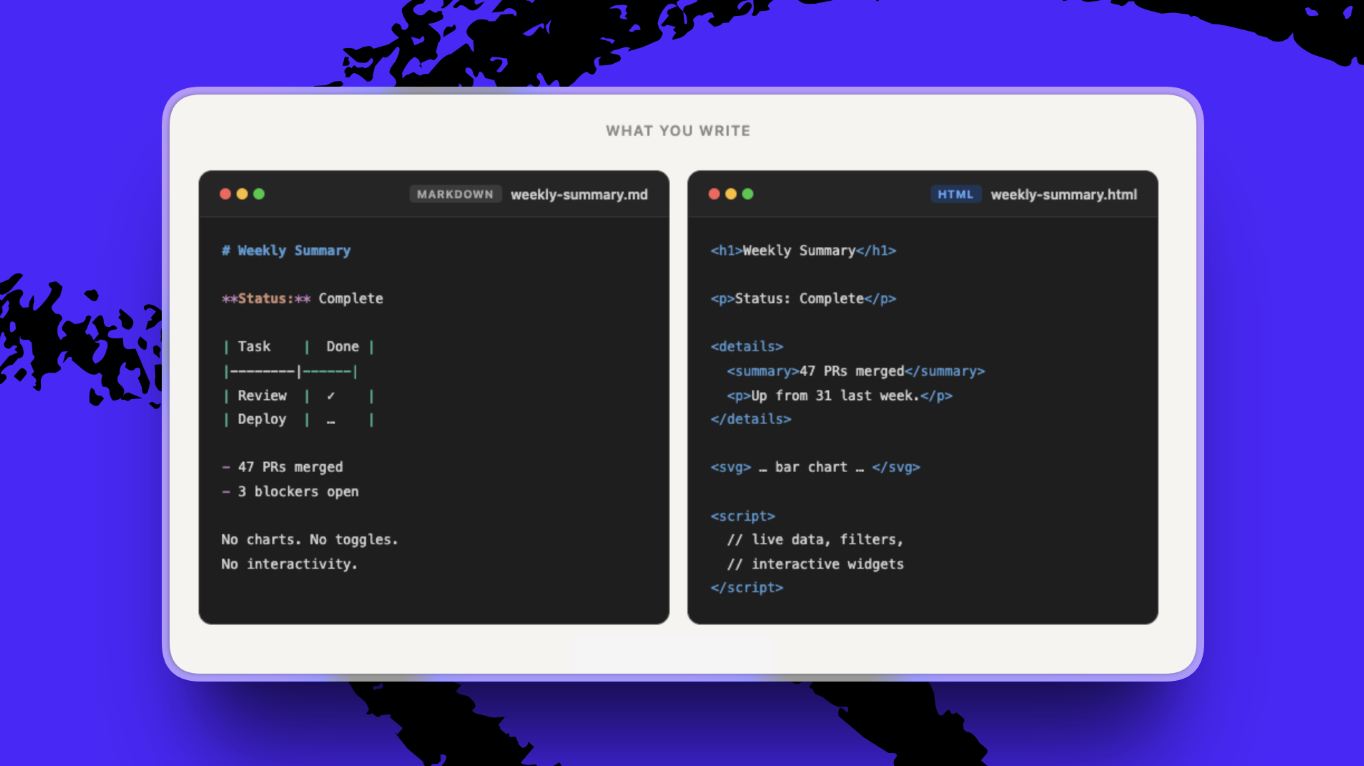
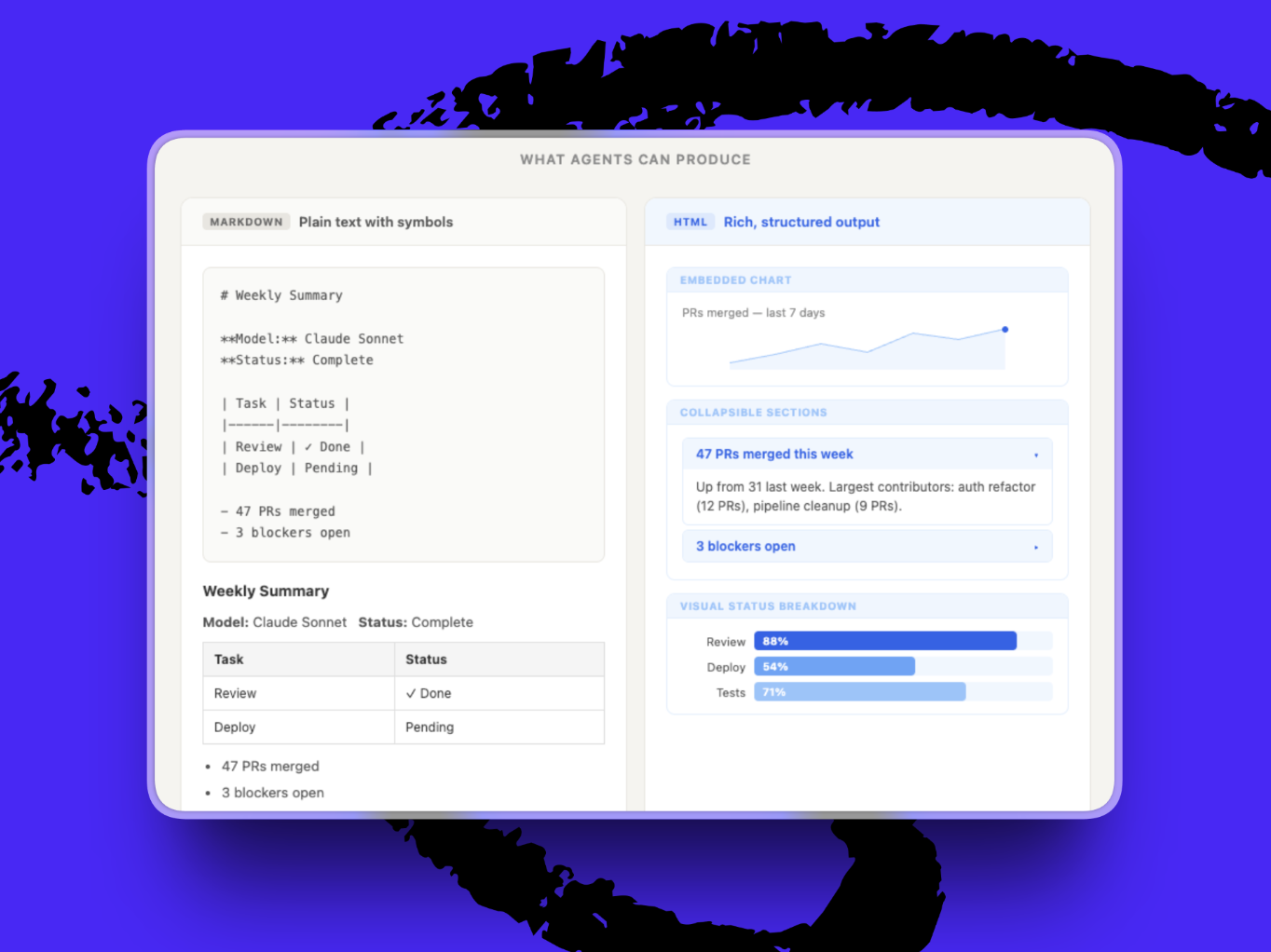
There’s a wrinkle, though: The tools we use to share and discuss documents, such as Slack and Google Docs, were all built for Markdown and plain text. Slack previews a Markdown file in the message, whereas HTML shows up as an attachment you have to download. Google Docs threads and GitHub diffs don’t know what to do with a self-contained HTML document. The moment agents start producing HTML by default, our tools will need to adapt to keep up.
What to do this week:
When you’re deciding between Markdown and HTML, ask whether the document is meant for humans or agents.
- Markdown if it’s for humans. It’ll be edited, refined, or read by an agent that needs to parse it. Examples: AGENTS.md, system prompts, project plans, briefs.
- HTML if it’s for agents. A human will consume it once and move on, or it benefits from visual structure. Examples: research summaries, weekly recaps, spec demos, dashboards.
Inside Every
Working with our agents in public
Working well with an agent is a skill new enough that there aren’t really best practices yet. So Every’s team has started learning from each other.
Last week, Every COO Brandon Gell and head of marketing Douglas Brundage each started public channels with their agents where anyone on the team can observe how they’re working together. Within 48 hours, a dozen people from across the company had joined to lurk.
The idea is that every request that would normally live in a direct message goes in the channel. Brandon asked the agent to pull a breakdown of where subscribers are located from Stripe. Douglas asked his to evaluate customer survey responses against classic marketing frameworks. There was a 41-message thread on whether to hook the agent into the Flora API.
The corrections double as useful material in the channel for learning—watching Douglas tell the agent its survey analysis is “performing research” rather than “mining the results for strategic clarity” gives the people watching an understanding of an agent’s limitations and hidden assumptions they should look out for in their own agentic work. Agents can learn from the interactions, too: Brandon has been routing every task through his agent for a week, even the ones he could do faster himself, so it can watch him work and write its own skill at the end. For now, the best way to learn how to work with agents may be to watch other people do it.
Katie Parrott is a staff writer at Every. You can read more of her work in her newsletter. To read more essays like this, subscribe to Every, and follow us on X at @every and on LinkedIn.
We build AI tools for readers like you. Write brilliantly with Spiral. Organize files automatically with Sparkle. Deliver yourself from email with Cora. Dictate effortlessly with Monologue. Collaborate with agents on documents with Proof.
We also do AI training, adoption, and innovation for companies. Work with us to bring AI into your organization.
For sponsorship opportunities, reach out to sponsorships@every.to.