

Was this newsletter forwarded to you? Sign up to get it in your inbox.
OpenClaw showed the world what an AI assistant could look like.
The open-source project became the most-starred software project in history in only 60 days, not because of hype. People were experiencing AI that didn’t just answer questions but did things. Managed your calendar. Sent emails. Controlled your browser. All triggered from a text message in WhatsApp or Slack.
I watched Sam Altman hire OpenClaw’s creator and Microsoft CEO Satya Nadella build “ClawPilot” on top of the framework. And the whole time, one thought kept nagging at me: Claude Code already does all of this. What’s so special about the crustaceans?
The answer was rooted in public perception. OpenClaw was marketed as an AI agent, and Claude Code was marketed as a coding tool.
We’ve now spent months building on both Claude Code and OpenClaw at Every—including Claudie, an AI employee who runs our consulting team’s back office. That work has shown us why initial excitement about OpenClaw is cooling—linked to its unreliability—and why Claude Code is the most capable platform for building an AI assistant today.
If you’re trying to build an AI that does things, you don’t need to wait for a better OpenClaw alternative because you already have one. Here’s the case for it, and how to use it.
Harnessing the models
Claude Code can do everything that made OpenClaw go viral: Use tools, manage files, and run for hours on its own. That’s not a coincidence because underneath, the two are the same thing: a harness for an AI model.
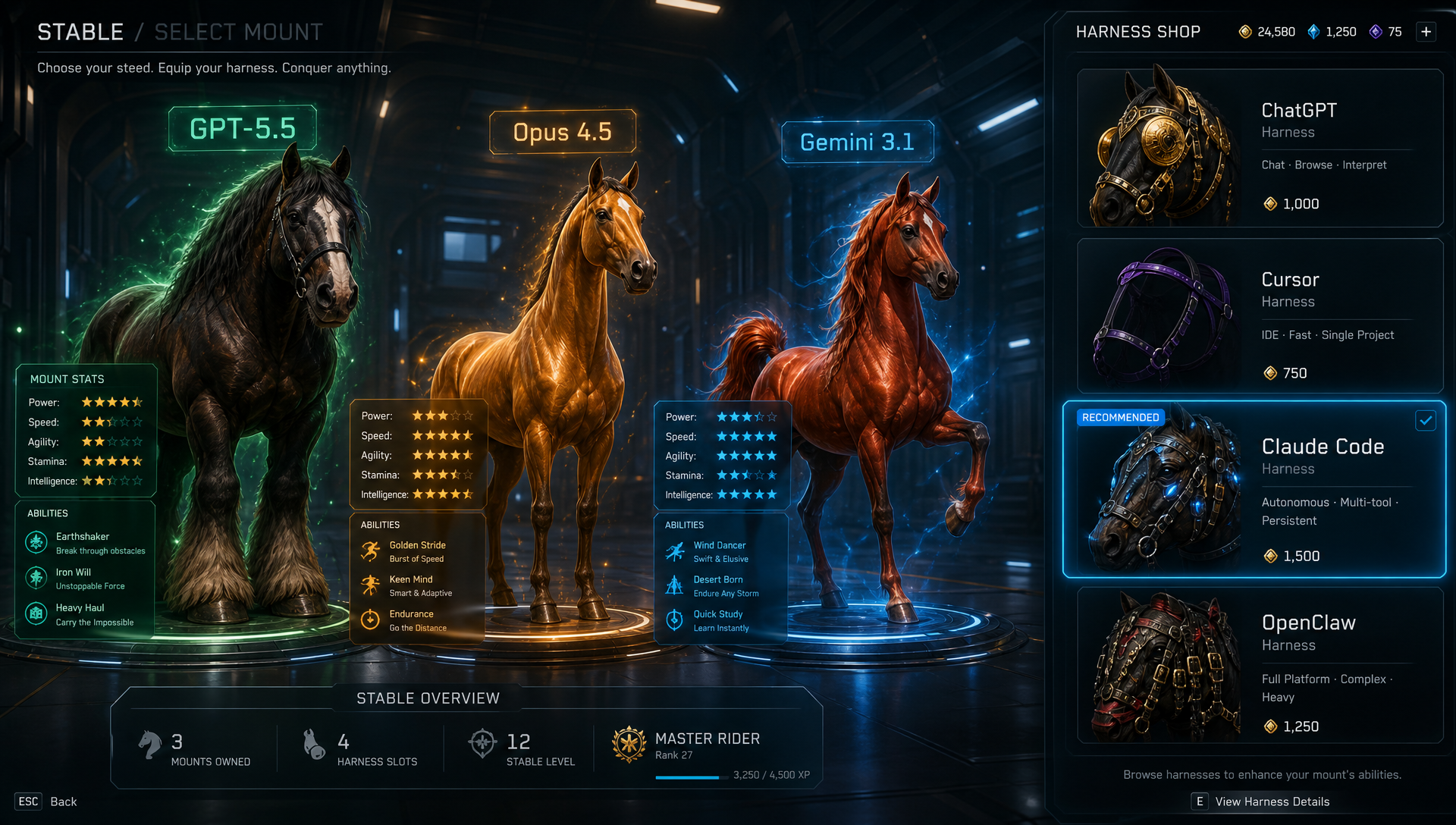
Think of AI models—Claude, GPT, Gemini—as powerful, capable horses. A harness is the thing that lets you direct that horsepower. It’s the software layer that sits between a raw AI model and the task you’re trying to accomplish. It decides how the model receives context, which tools it can use, how it remembers things across conversations, and how it talks to the outside world.
You’ve been using harnesses already: ChatGPT wraps a model in a chat interface that can browse the web and run code; Cursor wraps one in a code editor. Claude Code wraps one in something more open-ended: the ability to call tools, chain steps together, and work autonomously toward a goal. Which is exactly what OpenClaw does.
What people loved about OpenClaw—and how Claude Code gets you there
OpenClaw went viral because it made something click. For the first time, a lot of people watched an AI go off and complete a task. The unofficial tagline that emerged across reviews and threads was: AI that actually does things. Those capabilities break down into five categories—and Claude Code has every one.
1. It feels like a person.
OpenClaw follows you everywhere—it remembers what you were working on yesterday, knows what’s on your calendar, and has context about your work.
Why it feels that way has very little to do with which messaging app—Telegram, Slack, or iMessage—through which you reach it. The feeling comes from how much of your work and your life the agent can see. Because OpenClaw runs from your home folder, it can read every note, file, and folder in your machine, giving it the breadth of context an employee would have.
Most people don’t realize Claude Code can do the same thing. They run it inside a single project folder, so it feels like a coding tool—but that’s just the limited context they’ve given it.
This is an easy fix. Give Claude Code access to your whole computer, and now you have an “AI employee.”
By default, Claude Code asks for your approval before each action, whereas OpenClaw doesn’t. That’s prudent when you’re using it for professional work. But if you want it to have more autonomy, pass the flag --dangerously-skip-permissions.
2. It does things in the real world.
People who use OpenClaw all have a story about a magical “aha moment” when they saw it in action. They sent it a message and woke up to a working website with a payment processor wired in. They asked it to triage their inbox overnight and found the replies drafted by morning.
Similarly, Claude Code can operate your computer directly—create and move files, run programs, and read web pages. And both tools can plug into outside services—Google Workspace, your customer relationship manager, Asana, a calendar, a database—using model context protocol (MCP), an open standard Anthropic introduced.
3. It remembers (sort of).
People discovered OpenClaw could remember things long-term. Save a note today, ask about it a month later—“What have I read about X lately? —and it returns not just that note but related things you’d forgotten you wrote down.
Claude Code’s memory is more elaborate. It exists across three layers:
- A file called CLAUDE.md. It sits in any folder you run Claude Code from, and you fill it with whatever the agent should know. It reads it every time it starts up. It’s plain text, so you can edit it in any editor.
- A built-in memory system. As the agent works, it saves useful observations and pulls them back up later. It’s native to Claude Code, with nothing to set up.
- A local search engine. For Claudie, I added qmd, an open-source tool that indexes every conversation log, meeting transcript, and work document on the machine, and lets her search across all of it.
4. You can teach it new skills.
OpenClaw lets you teach it new tricks: Write a simple text file describing a task you want it to handle—a ”skill”—and the agent picks it up and follows it. At Every, we have skills for building decks with the right branding, managing client dashboards, and doing project management in Asana.
Skills are an Anthropic standard, which means Claude Code has the same system built in. A skill written for OpenClaw runs in Claude Code as is, no changes needed.
5. It runs on its own and works while you sleep.
OpenClaw’s calling-card feature is called the heartbeat—a process that runs every minute, decides what needs doing, and does it. At 6 a.m., before you’ve looked at your phone, it has read your overnight email, scanned your calendar, drafted your daily briefing, and queued up replies to the messages that need them.
Underneath, the heartbeat is a cron job. Cron is a piece of software that’s been built into the Mac and Linux operating systems since the 1970s, and it does exactly one thing: run a piece of code on a schedule. That could be every minute, every hour, or every Monday at 6 a.m.
Claude Code could plug into the same system. It has a mode (called “headless”) where you hand it a task, and it runs on its own, without you sitting in front of it. Pair that with cron, and you’ve got an AI that works while you sleep. Even Peter Steinberger, the creator of OpenClaw, has said that this Claude-Code-plus-cron-job setup is the same as OpenClaw.
Where OpenClaw falls short
We’ve established that OpenClaw and Claude Code can do many of the same things. So why do I steer people toward Claude Code? A few reasons.
Let me give credit where it’s due: OpenClaw showed the world something important and earned every one of its 380,000 GitHub stars. But when I dug into the codebase, I found complexity that created more problems than it solved.
The session problem
OpenClaw keeps a single session running for each user, for as long as it can. Every message you send during the day lands in that same session, piling up context as it goes. Use OpenClaw for a lot of tasks, and by midday, the session can be carrying more than 50,000 tokens—roughly a long document’s worth of text. It’s supposed to reset every day at 4 a.m., but it can be unreliable. So you might type a simple “hi” in the morning and get billed for 50,000 tokens—about $0.25 on GPT 5.5 or Opus 4.8—because the system resumed yesterday’s bloated session instead of starting fresh.
Mike Taylor, a teammate who used our Plus One AI assistants—which were built on OpenClaw—ran into exactly this. He checked the logs and found one endless thread stretching back to day one. Every message he sent was eating through tokens because it was all crammed into one giant session.
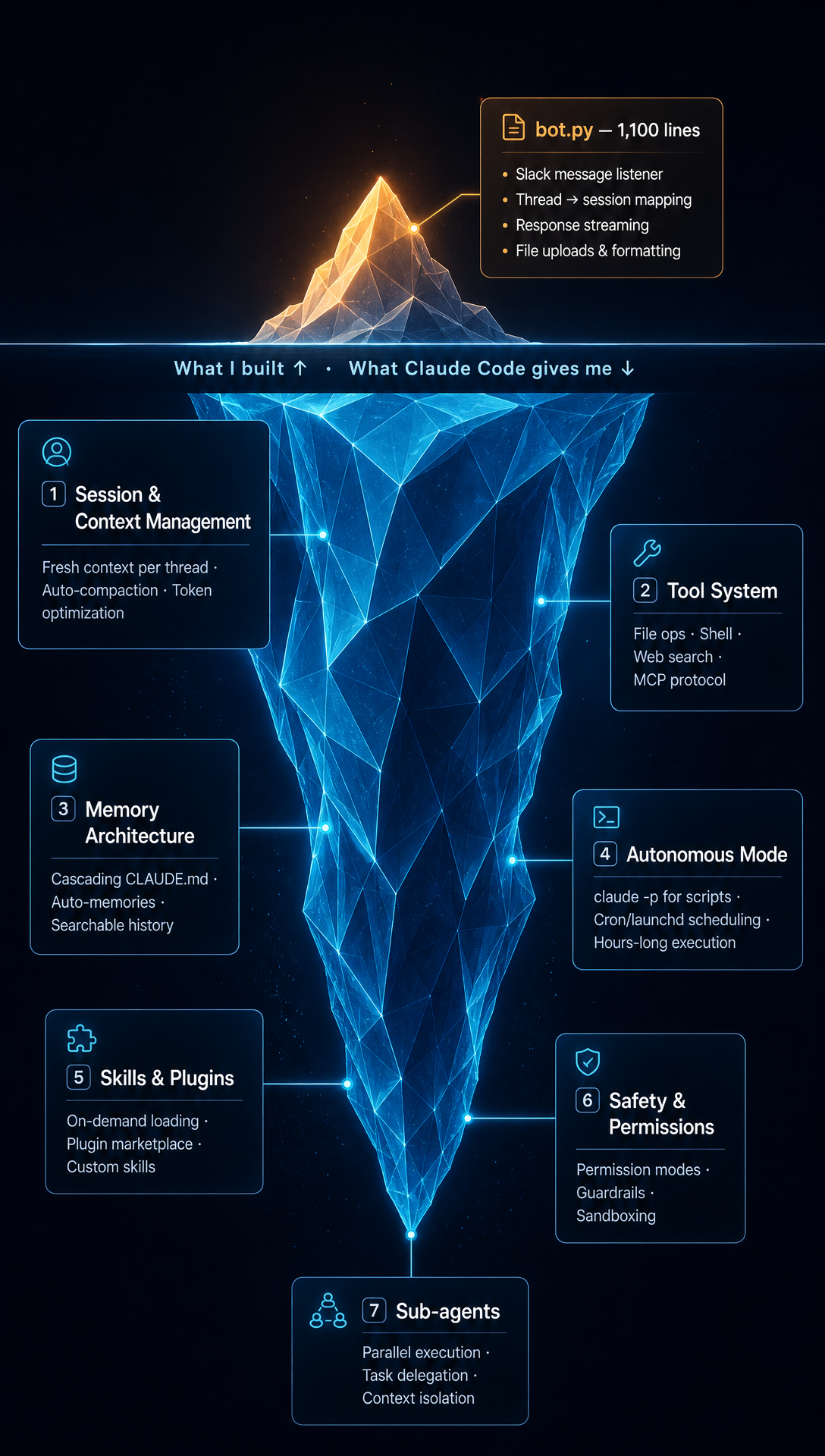
With Claude Code over Slack, it works differently: One thread is one session. Start a new thread and get a clean context window. Each session opens with just its baseline instructions and your CLAUDE.md file—the standing context you’ve written for it—which usually runs 2,000 to 5,000 tokens, not 50,000. And when a thread does get long enough to need compaction, a process where the system compresses older conversation history to make room for new information, Claude trims it back automatically.
The memory problem
OpenClaw’s memory system is elaborate. It’s built to remember details across conversations so the agent doesn’t start from scratch every time you message it. To do that, it runs on:
- Eight separate bootstrap files, the files that it writes when you first start it up, each storing a different kind of information about you, including AGENTS.md, SOUL.md, TOOLS.md, IDENTITY.md, USER.md, HEARTBEAT.md, BOOTSTRAP.md, and MEMORY.md
- A memory consolidation “dreaming” process, where it reviews everything that happened during the day and decides which scraps are worth keeping and which to forget
- Multiple ways to search
- A storage layer that organizes what it knows, with evidence attached to each claim, like a personal Wikipedia
As an engineer, I can appreciate why they might have built it this way, but as a user, this sophistication has a cost.
When OpenClaw makes a mistake—forgets something important or acts on stale information—the answer could lie in any of a half-dozen places: the bootstrap files, the daily notes, the dreaming process, a condensed version of older notes, what’s saved when the system clears its short-term memory, or the encyclopedic storage layer. Often, there’s no way to tell which, which makes the root cause impossible to diagnose.
In contrast, Claude Code’s memory is stored in plain Markdown files. When the AI does something weird, you open the relevant CLAUDE.md or memory file and see exactly what it’s been told—the instructions and remembered facts it’s acting on. Debugging is just editing a text file.
It’s worth asking why OpenClaw’s system got so complicated. One likely answer is that each layer exists to patch a weakness in the simpler one beneath it. Start with plain notes in a file, and soon the agent needs a way to search them—so search gets bolted on. Each functionality adds another layer where something can go wrong.
Building Claudie on Claude Code
Every’s consulting team needed an AI employee to handle operations—track engagements, manage communications, update dashboards, and follow up on tasks with our clients. Knowing what we’d learned about both tools—especially OpenClaw’s unreliability—we built that employee, Claudie, on Claude Code.
Our team lives in Slack, so Claudie needed to be there, too. That meant writing a layer of code to connect Claude Code to Slack—about 1,100 lines of Python. It listens for messages in Slack, hands them to Claude Code, streams the responses back, and takes care of housekeeping like formatting and file uploads. Everything else—sessions, memory, tools, and skills—Claude Code handles on its own.
Claudie runs 24/7 on a Mac Mini, so she doesn’t depend on anyone’s laptop being online. She kicks off scheduled jobs on her own—morning briefings for the team, pipeline updates, inbox triage, client dashboards—and she’s plugged into Google Workspace, Asana, our CRM, and meeting transcripts. A three-layer memory system lets her hold context across hundreds of conversations, both internal (Slack) and external (email, Granola).
Day to day, maintaining her breaks down to roughly 5 percent keeping the system running, 30 percent managing her memory, and 65 percent building new skills and deciding what to automate. The memory work involves auditing what she remembers, figuring out why she sometimes surfaces the wrong thing at the wrong moment, adding new memories, and updating her SKILL.md file.
What Claude Code taught us about AI employees
I spend very little time maintaining Claudie’s harness—the layer connecting her to Claude Code—because, unlike OpenClaw, Claude Code is a stable, well-engineered foundation. That stability is what most people missed when Claude Code launched.
OpenClaw was sold as an AI employee: “AI that actually does things.” Claude Code was marketed as a coding tool. But under the hood, Claude Code had everything you’d need to build an AI assistant—tools, memory, and autonomy.
Anyone can get the technology running. The hard part is figuring out what to hand off and how. We realized that Claudie’s task list in Google Sheets had become unmanageable, so we moved her to Asana. When the off-the-shelf Asana connector kept breaking, we built our own. We had to work out how much she should remember from past conversations—enough to be useful, but not so much that it throws her off. And we had to teach her how we think about consulting, not just how to use the software. Claude Code gives you a foundation stable enough to spend your time on that work—instead of spending your weekend figuring out why Claudie stopped responding.
OpenClaw deserves credit for making people want an AI employee. But the tool to build one was already sitting on developers’ laptops.
Nityesh Agarwal is a senior applied AI engineer at Every Consulting, where he builds and maintains Claudie and other automations. You can follow him on X at @nityeshaga.
To read more essays like this, subscribe to Every, and follow us on X at @every and on LinkedIn.
For sponsorship opportunities, reach out to sponsorships@every.to.
Help us scale the only subscription you need to stay at the edge of AI. Explore open roles at Every.